
Every transaction a UAE business records has two sides that accounting software checks for balance before saving the entry.
In this guide, I'll walk you through the debits and credits that reach Xero for card spend, fees, refunds, top-ups and supplier bills, using Pemo, our own platform, as the worked example.
TL;DR
- Double-entry automation: software builds both sides of each entry from a source document, such as a card transaction or a supplier invoice.
- One card payment, two sides: in Xero, a VAT-inclusive card expense debits the expense and VAT accounts against a credit to the Pemo Wallet's account.
- Each money movement posts differently: fees post apart from the purchase, refunds return as money received, top-ups move between two balance sheet accounts and paid bills clear a payable.
- Judgement entries stay manual: accruals, depreciation, intercompany charges and year-end adjustments still need an accountant.
- Most errors start in the mapping: a wrong account or VAT code repeats on every export until someone corrects the rule behind it.
- In Pemo, Xero comes first: the Pemo Wallet needs its own payment account in Xero before the first expense can be exported.
What is double-entry accounting automation?
Double-entry accounting automation means software creates both sides of a bookkeeping entry from a source document, leaving a person to review the result before it posts.
Under double-entry bookkeeping, every transaction changes at least two accounts by the same amount.
One account takes the debit and another takes the credit for the same total.
That balance follows the accounting equation, in which assets equal liabilities plus equity.
Software prepares each entry under the same debit-equals-credit rule a bookkeeper follows.
When I explain the setup to finance teams, I break it into four working parts:
- A source document: a card transaction, receipt, supplier invoice or bank movement that starts the entry.
- Posting rules: the account, VAT code, vendor and any tracking category that each type of document maps to.
- The ledger: accounting software such as Xero, recording the entry against the chart of accounts (our guide to the complete UAE finance stack compares the options).
- A review step: someone who checks the suggested coding before anything is exported.
In a typical UAE setup, a spend platform prepares that source data before the ledger records it.
Our ranking of the 10 best accounting automation software in the UAE compares the main options for that preparation step.
How does one card expense become a double entry in Xero?
One VAT-inclusive card expense becomes a three-line entry in Xero, with the expense and the VAT on the debit side against the Pemo Wallet account on the credit side.
The example I use most often is a team member buying printer toner for AED 892.50 from a UAE stationery supplier on a Pemo card.
The receipt shows AED 850.00 before VAT, plus AED 42.50 of VAT at the UAE's standard 5% rate.
Pemo exports the full AED 892.50 to Xero as a VAT-inclusive amount, along with the account, vendor, payment account and receipt.
Xero then splits out the tax using the VAT rate on the line to produce this entry:
The two debits record the toner and the VAT paid on it, against a single credit for the money leaving the Pemo Wallet.
Nobody typed these lines by hand, which kept the finance team's part to checking the suggested account and VAT code before export.
💡 Pro tip: a receipt shows the VAT a supplier charged, but how much of it the business can recover is a call for your finance team or tax advisor.
Which business transactions can post automatically?
Card purchases, card fees, refunds, cashback, wallet top-ups and paid supplier bills can all post automatically, as each one reaches the ledger with enough data for both sides.
Here's how each one reaches Xero from Pemo:
The four examples below follow the same Dubai team and Xero file.
What entries does a foreign-currency payment with a fee create?
Paying in a foreign currency creates two entries in Xero, one for the purchase and one for the international transaction fee, both under a single Pemo Export ID.
Let's say a US software subscription comes through at AED 1,100.00 on the Pemo statement.
According to Pemo's Xero export guide, Pemo sends that AED amount as paid, without an exchange rate.
On Xero Premium, switching on multi-currency lets Xero convert the AED figure back into the original currency.
Pemo's fee schedule lists a 3.68% international transaction fee, VAT inclusive, putting the fee on this payment at AED 40.48.
The fee posts to the default fee account chosen in Pemo's Accounting Settings:
Only the purchase entry carries the receipt.
I've left VAT off both lines on purpose, because the VAT treatment of an overseas subscription and of the fee is your finance team's call.
For the fee side, Pemo issues a monthly tax invoice on the 3rd covering the previous month's fees.
Is a card refund recorded as income?
No, a card refund reverses the original cost, which Pemo sends to Xero as a "Receive money" transaction into the Pemo Wallet account.
Suppose the team sends back a keyboard bought for AED 315.00, of which AED 15.00 was VAT.
With the same account and VAT rate as the original purchase, the refund posts like this:
Cashback and chargebacks take the same "Receive money" path into Xero.
For cashback, an other-income account is the usual pick for the credit side, though the choice belongs to the finance team.
Pemo's help centre describes this route as a safeguard against refunds being mistaken for new expenses.
Why does a wallet top-up post as a transfer?
Top-ups post as transfers because the company is only moving its own money between two balance sheet accounts.
Moving AED 25,000 from the company's main operating account into the Pemo Wallet gives this entry:
Pemo's export guide says top-ups and withdrawals both go across in this transfer format when the cash ledger is enabled.
In my experience, this is the entry that causes the most month-end confusion, since the same AED 25,000 also appears on the main bank's feed in Xero.
What happens to a supplier bill paid through Bill Pay?
Two entries reach Xero for every supplier bill paid through Bill Pay: the bill creates a payable and the payment clears it.
The invoice in this example comes from a video production supplier, at AED 12,000.00 plus AED 600.00 of VAT.
Bill Pay reads the invoice and, once it's approved, pays it from the Pemo Business Account when the POA (Payment Order Authorizer) releases the money.
Pemo's help centre has the bill showing as paid in Xero once it's paid in Pemo.
The ledger then holds these two entries:
Accounts Payable nets to zero once both steps have posted.
The AED 0.50 local transfer charge (VAT inclusive, for transfers up to AED 50,000) stays out of the table, as it's a separate bank charge.
Do any entries still need an accountant?
Yes, entries that rest on estimates or period-end decisions still need an accountant, since no card payment or supplier invoice carries the information behind them.
These come up in almost every UAE month-end close I've worked through:
- Accruals: costs incurred during the month that have no invoice yet, such as a utility bill arriving after the books close.
- Prepayment releases: spreading an annual payment, such as an insurance premium, across the months it covers, even when the payment itself went through Pemo.
- Capital purchases: deciding whether a laptop bought on a card is an expense or a fixed asset, then running its depreciation.
- Intercompany charges: costs one group company recharges to another, which need matching entries in both sets of books (our multi-entity expense management playbook has the entity-level setup).
- Year-end and tax adjustments: audit adjustments and corporate tax provisions agreed with the auditor or tax advisor, usually as part of the year-end close.
Based on my experience, prepayment releases slip most often once card spend is automated, because the payment already looks finished in the ledger.
Where do automated entries usually go wrong?
Automated entries usually go wrong in the mapping, because software repeats whatever account and VAT code it's given on every export.
When the numbers look off, these are the causes I check first:
- Wrong account mapping: a pattern coded wrongly in the first weeks can keep repeating, since Pemo Copilot learns from past entries.
- One VAT code for everything: a single default code ignores the gap between the VAT a supplier charged and the VAT a business can recover.
- Top-ups booked as costs: if the main bank feed codes a wallet top-up as an expense, every card payment exported from Pemo gets counted a second time.
- Unsettled charges: pending transactions and merchant card checks can change or reverse before they settle, the reason Pemo's Accounting Export page lists settled expenses only.
- Currency differences: a USD receipt and an AED ledger line show different figures for one payment, an expected gap when the export carries the AED amount paid.
- Missing vendors: Pemo keeps an expense marked incomplete until it has both an account and a vendor, bringing gaps to light before export.
The top-up problem is the one I'd fix first, because a single miscoded top-up can double a month's card costs in the profit and loss.
How should a UAE finance team set up double-entry automation?
A UAE finance team should set up double-entry automation ledger-first, then run one month alongside the old process before switching over.
Most of the effort goes into pre-accounting, the stage our guide to automating accounting data entry for UAE SMEs covers in depth.
It's ideal to start with the ledger and work outwards in this order:
- Clean up the chart of accounts: archiving unused accounts first leaves one account for each type of cost the team spends on.
- Give each money source its own account: every source of company money, from the card wallet to a petty cash float, needs its own Cash or Bank account in the ledger.
- Line up the VAT codes: the spend platform should only offer the tax rates the ledger already holds.
- Bring vendors across with their TRNs: a matched vendor list stops each export from creating duplicate contacts.
- Choose where fees and cashback post: picking both accounts up front keeps them out of a suspense account.
- Name a reviewer: one person checks the suggested coding and marks each expense ready before export, which works best alongside a reinforced expense policy.
- Run the first month both ways: you'll want to compare the profit and loss from the automated entries against the manual version, line by line.
My advice here would be to hold supplier bills back until that first parallel month balances, since card spend gives the cleaner test.
Can Pemo automate double-entry bookkeeping?
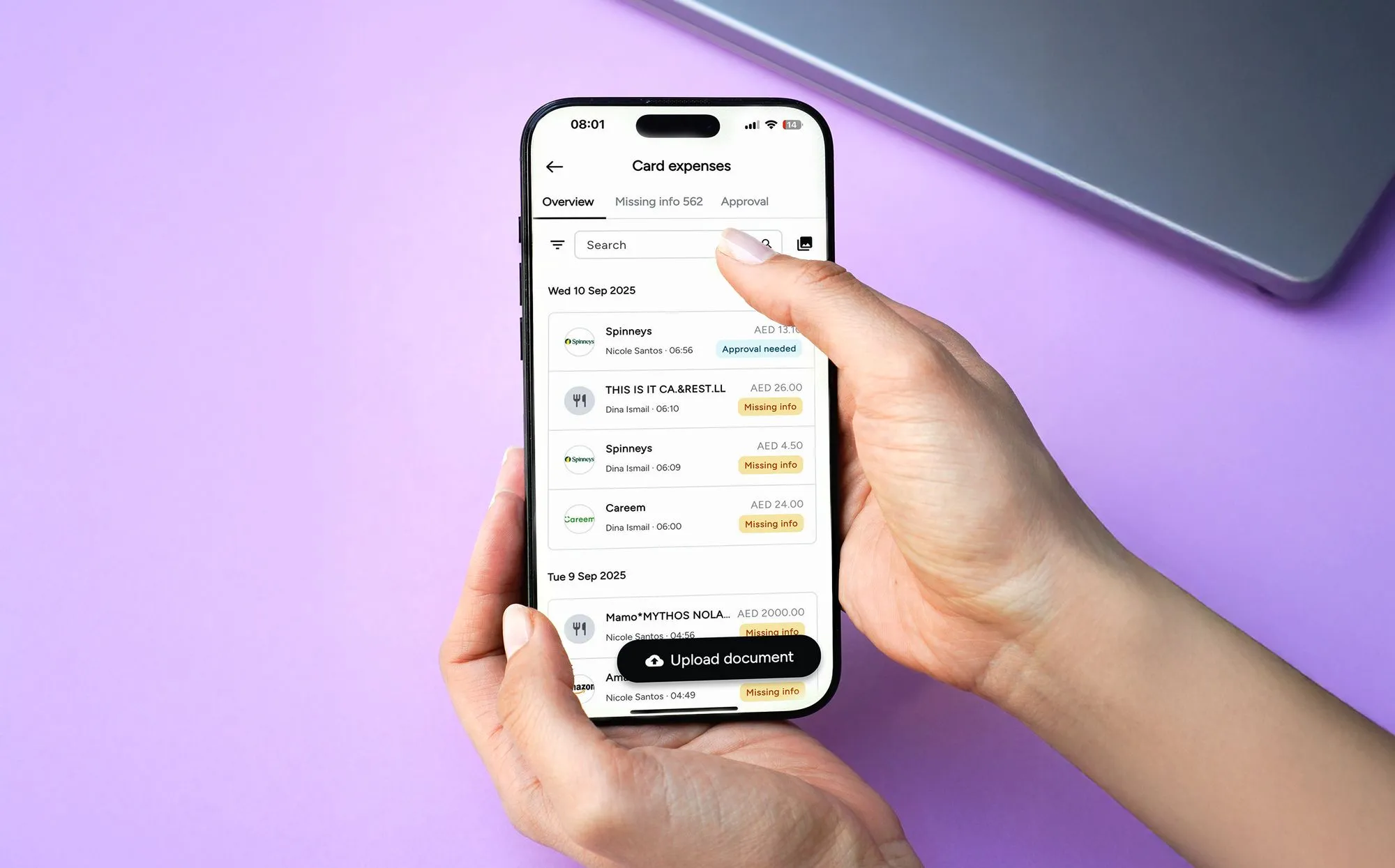
Yes, Pemo (that's us) sends each card payment, fee, refund, top-up and paid bill to the ledger, filling in the account, VAT rate and vendor on card expenses and attaching their receipts.
The Pemo card is issued by Nymcard Payment Services LLC, which is authorised by the Central Bank of the UAE.
The Pemo Business Account is provided by ruya, a UAE-licensed, Shari'ah-compliant community bank.
Here's how I'd sum up the setup:
- Pemo Wallet account: in Xero, the wallet gets its own Cash Account or Bank and Cash account, credited on every card purchase (other supported ledgers are listed on Pemo's accounting page).
- Pemo Copilot: suggests the account and VAT rate for each expense based on past coding, once Xero is connected and the chart of accounts holds at least three accounts.
- Separate exports: every wallet movement goes across as its own entry, from fee expenses under one Pemo Export ID to "Receive money" refunds and top-up transfers.
- Bill Pay: once the POA authorises the payment with a one-time SMS code, the paid bill syncs to Xero with a paid status (more on approvals in our AP automation guide for Dubai SMEs).
Pemo's pricing
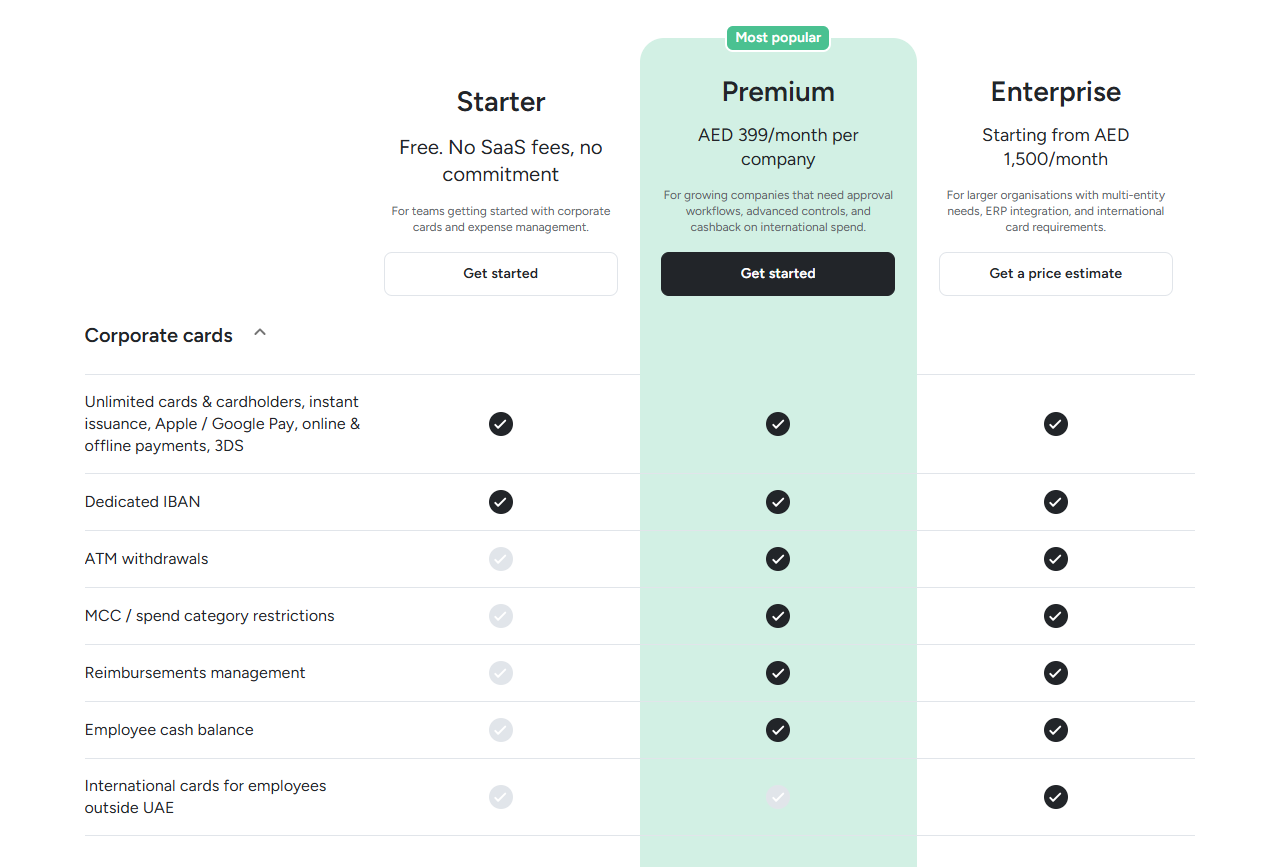
Pemo prices every plan per company, whatever the number of users or cards:
- Starter: free, covering auto coding, VAT coding, vendor mapping, custom fields, Pemo Copilot and the standard accounting integrations.
- Premium: AED 399/month per company, unlocking reimbursements management, split expenses, multi-layer approvals, VAT visibility and NetSuite or Dynamics 365 Business Central.
- Enterprise: pricing starts at AED 1,500/month for larger, multi-entity organisations, covering budgets and developer API access alongside custom-built exports and a custom ERP integration.
- Pemo Business Account: the ruya account that Bill Pay pays from is listed at AED 200/month, discounted to AED 99/month as of October 2026.
When are the books ready to close at month-end?
The books are ready to close once Xero's Pemo Wallet account shows the same closing figure as the Pemo Wallet Statement, with no settled transaction left unexported.
Before signing off a month, I usually run through these checks:
- Export progress: the Wallet Reconciliation Graph on Pemo's Transactions tab shows what share of card transactions and wallet movements has already gone to Xero.
- Closing balance: the Pemo Wallet Statement shows the month's opening balance alongside every amount in and out, ending on a figure to match against the wallet account in Xero.
- Top-ups on both sides: each transfer into the Pemo Wallet should pair with an outgoing line on whichever account funded it, the Pemo Business Account or another business account in the company's name.
- Fee invoice: the fee account in Xero should agree with the tax invoice Pemo issues on the 3rd for the previous month's transaction fees.
- Cashback: the statement shows how much cashback reached the Pemo Wallet that month, a figure the matching "Receive money" entries should equal.
- Paid bills: anything settled through Bill Pay should have dropped out of Xero's list of bills awaiting payment.
The Statements menu offers the statement as a CSV for importing into accounting software, alongside PDF and Tax Invoice versions.
Automate your double entries with Pemo
If you're starting from scratch, card spend is the easiest place to begin, since each card payment already arrives with an amount, a date, a merchant and a receipt.
After one clean close on card spend, supplier bills can move into Bill Pay.
Pemo's Starter plan costs nothing, giving a finance team room to connect Xero and run a month of card expenses through it before choosing a paid plan.
A Pemo demo shows the Xero export and Bill Pay running on live transactions, which is useful if you're considering Premium or opening a Pemo Business Account.
Double-entry accounting automation FAQs
Who should review automated entries before they reach Xero?
I'd give the review to whoever owns the chart of accounts, usually the in-house accountant or an external bookkeeper.
In Pemo, that person marks each reviewed expense as ready on the Accounting Export page, then exports the batch.
Where the CFO signs off the close, our guide to the best CFO tools in the UAE covers the reporting tools around that step.
Does Xero create double entries automatically?
Xero creates the double entry behind each transaction it records, splitting out the VAT according to the tax rate on each line.
Manual journals are the exception, as the person entering one picks both sides.
What does Pemo send to Xero with each expense?
Each Pemo export carries the expense date and ID, the AED amount paid, the VAT type and rate, and the attached receipt.
The accounting fields go across too: the chart of accounts line, vendor, payment account, tracking categories and memo.
How often does Pemo sync with Xero?
Pemo refreshes its copy of your Xero accounts and vendors once a day, tracking categories included.
Card expenses move to Xero when the finance team exports them from Pemo's Accounting Export page.
Paid bills from Bill Pay are the exception, syncing to Xero automatically.
Which other accounting software does Pemo export to?
Pemo's help centre has export guides for QuickBooks, Zoho Books and Wafeq as well as Xero.
Odoo and Mazeed join them as standard integrations on every plan, alongside NetSuite and Dynamics 365 Business Central from Premium upwards.
Any other ledger can take a bulk file through Pemo Universal CSV.


