
Handling employee expenses in the UAE in 2026 comes down to picking between four common methods, and the one you choose decides whether your finance team chases receipts every month-end or closes books quickly.
TL;DR
- Many UAE businesses still run on petty cash, reimbursements, or shared corporate cards, and each one starts breaking down once the team hits 10 to 15 people.
- The four main methods for handling employee expenses are petty cash, employee reimbursements, traditional corporate cards from banks, and spend management platforms with virtual corporate cards.
- Pemo is the best way to handle employee expenses in the UAE in 2026, with one virtual corporate card per employee, real-time spend controls, auto-matched receipts, and direct integrations with QuickBooks, Xero, Zoho Books, Wafeq, and Tally.
Why is employee expense management harder than it looks in the UAE?
The UAE has a few quirks that make expense management trickier than it sounds on paper.
First, there's VAT.
Every business transaction needs a tax-ready invoice with the right details, and missing receipts can quickly turn into compliance issues when filing season rolls around.
Second, your spend usually mixes AED purchases with USD ad platforms like Google Ads and Meta, plus FX fees on regional and global suppliers.
That means your finance team is reconciling across currencies, payment methods, and merchant types, often by hand.
Third, corporate tax is now a real consideration for UAE businesses.
The cleaner your expense records are throughout the year, the less painful tax season becomes.
And then there's the cultural default.
Petty cash and reimbursements have been the standard for UAE SMEs for decades. They work fine when you're a five-person team.
They stop working the moment you scale past that, and most companies don't switch methods until something visibly breaks.
What are the different ways that UAE businesses handle employee expenses today?
There are four common ways UAE businesses handle employee expenses in 2026:
Now let's go through each method in detail.
Method 1: Petty cash
Petty cash is the oldest method on the list, and it's still surprisingly common across UAE SMEs.
Here's how it works in practice:
A finance team keeps a small amount of physical cash in the office, usually between AED 500 and AED 5,000, and employees pull from it for small day-to-day purchases like office supplies, taxis, courier fees, or client coffees.
A petty cash log tracks what's taken out and what's spent.
It works for very small businesses with under five people, especially when most purchases are small AED amounts at local merchants. Setup costs are zero.
But petty cash starts breaking down fast:
- At some point, receipts go missing.
- The log gets filled in days later, from memory, and the numbers stop matching the cash in the box.
You can't trace who spent what without sitting people down and asking.
VAT records are inconsistent because not every local merchant gives you a tax invoice with a small cash purchase, and even when they do, those slips get crumpled in pockets and lost.
By the time the month-end arrives, your finance team is doing manual reconciliation against a paper log, and the discrepancies pile up.
Method 2: Employee reimbursements
Reimbursements are the default fallback for many growing UAE businesses.
The workflow is familiar:
Employees pay for work expenses with their personal cards or cash, save the receipts, submit a reimbursement request, get manager approval, and then wait for finance to process the payment back into their account.
It's easy to set up because it doesn't require any cards, accounts, or new tools.
For occasional out-of-pocket spending, like a one-off client lunch or a small office purchase, reimbursements work fine.
But this method has real problems once it becomes the primary way your team spends.
Employees end up floating company money on their personal credit cards.
For larger purchases like flights, hotels, or vendor payments, that's a real financial burden on the team.
Some employees won't take work trips or pay for tools because they don't want to put them on their personal card.
The receipt chase at month-end is brutal for finance teams.
Reimbursement requests come in late, with missing or blurry receipts, and the back-and-forth eats hours every week.
You don't get real-time visibility either.
Finance only finds out what was spent when employees decide to submit, which means the books don't reflect actual spending until weeks after the fact.
And every reimbursement transaction means a manual journal entry, manual VAT capture, and manual categorization in your accounting software.
For occasional spending, reimbursements still make sense. However, if this were your default method, they're slow and expensive in finance team time.
Method 3: Traditional corporate cards from banks
The third method is the traditional corporate credit card, issued by your UAE bank as part of your business banking setup.
Most UAE banks offer corporate cards tied to your business account, which is why this is the default method for many enterprises in the country.
The setup goes through your relationship manager: you apply, wait for approval, receive a physical card, and use it for company spending.
This method works for one or two designated spenders, usually a CFO, COO, or operations lead, who handle larger transactions like vendor payments, travel, and big-ticket items.
The card statements are clean, the credit terms can be generous, and for large purchases, the fraud protection is solid.
But traditional bank-issued corporate cards run into a few common challenges when you try to use them as your default method for handling employee expenses across a growing team:
- The first is volume. Most business banking packages come with a small number of cards, which means employees either share them (a compliance and security concern) or end up back on reimbursements anyway.
- Per-employee spending controls and merchant category restrictions are often more limited than what spend management platforms offer.
- Direct integration with accounting software like QuickBooks, Xero, or Zoho Books is rarely built in at the card level, so your finance team usually still has to export statements, categorize manually, and reconcile by hand.
- Card issuance timelines vary as well. Depending on the bank and your relationship, getting a new card for a new hire can take anywhere from a few days to a few weeks.
Traditional corporate cards from banks work well as one piece of a broader finance stack.
They tend to fall short as the primary way to handle employee expenses across a team of 10 to 100 people or more.
Method 4: Spend management platforms with virtual corporate cards
The fourth method is the modern answer to all of the above.
Spend management platforms give you virtual corporate cards that you can issue to every employee, with real-time tracking and accounting automation built in:
- Instead of one bank card shared across the team, every employee gets their own virtual (or physical) corporate card.
- Instead of reimbursements, employees pay directly with their card, and the company is the one floating the money.
- Instead of a monthly statement, you see transactions live as they happen.
- Instead of petty cash slips, every transaction has a digital receipt attached automatically.
- And instead of exporting CSVs into your accounting software, the spend management platform syncs transactions in real-time.
This is the category Pemo plays in (that’s us), alongside other UAE and global platforms.
Spend management platforms work for teams of all sizes, from two-person startups to 200-person SMEs and beyond.
They scale because every new employee just gets their own card from the dashboard, with custom limits and policies attached, in seconds.
The setup cost is low, the monthly cost is predictable, spending control is tight, and the time saved at month-end usually pays for the platform several times over.
For UAE businesses that want to stop chasing receipts, eliminate petty cash, and close books in days instead of weeks, this is the method that actually works.
What makes Pemo the best way to handle employee expenses in the UAE?
Pemo’s spend management solution offers the best way to handle employee expenses in the UAE with our virtual corporate cards that can be issued in seconds, real-time spending visibility, and spending controls.
Our platform is designed to eliminate petty cash and reimbursements, so that your finance team stops scheduling reminders to chase receipts.
Let's go through the features that have made 10,000+ businesses trust Pemo: 👇
One Virtual Corporate Card Per Employee, Issued In Seconds
The first thing Pemo changes is who gets a card.
Every employee who needs to spend company money can have one, with no waiting period and no application form through a bank.
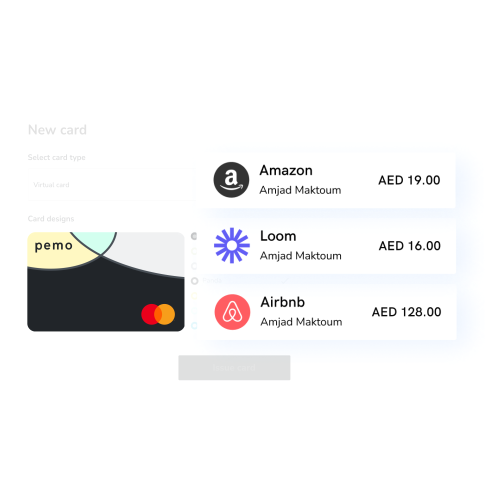
Each card carries:
- Custom spending limits per transaction, daily, weekly, monthly, or yearly to match the employee's role and budget.
- Merchant category restrictions so a marketing card can't be used at a restaurant, and a travel card can't be used on subscriptions.
- Instant freeze and unfreeze from desktop or mobile if a card is compromised or an employee leaves the company.
- Mobile wallet support for Apple Pay, Google Pay, and Samsung Pay, so employees can pay without carrying physical cards.
- Single-use virtual cards for one-off purchases, such as a vendor payment or a software trial subscription.
You can also issue physical cards for cash withdrawals, travel, and a small set of merchants that still don't accept virtual payments.
Real-Time Spend Visibility For Finance Teams
Finance teams can filter the live transaction feed by employee, by department, by card, or by merchant.
You’ll be able to see which receipts have already been matched, which ones are still missing, and which transactions are waiting on approval.
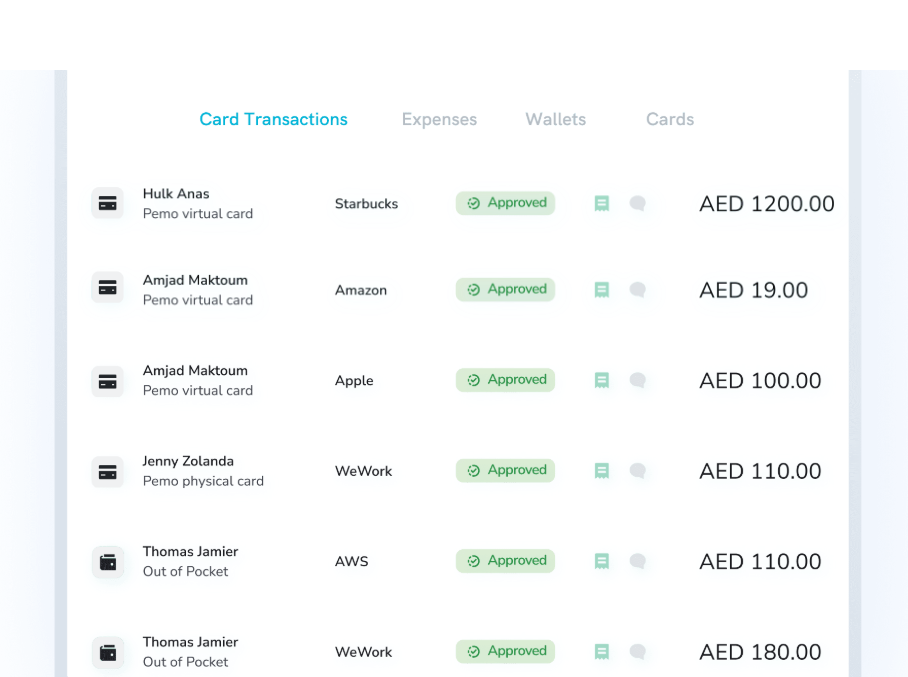
Approval workflows route each expense to the right person based on amount, category, or team.
Cash flow data updates throughout the day, so the CFO never has to ask "where do we stand on spending this month?"
Many UAE finance teams currently spend the first week of every month reconstructing what happened the previous month.
With Pemo, they're working in the present instead of reverse-engineering the past.
Accounting Sync And The Pemo Copilot
Every transaction Pemo captures runs through Pemo Copilot, our AI categorization engine.
It assigns the right chart of accounts code, picks the right vendor, applies the correct VAT treatment, and learns from the corrections you make.
A few months in, it's getting categorization right on its own most of the time, and your accountant is approving rather than building from scratch.
That data flows directly into the accounting platform you already run on:
- QuickBooks Online and Desktop.
- Xero.
- Zoho Books.
- Wafeq, the FTA-accredited platform built for MENA compliance.
- Tally.
- Microsoft Dynamics 365.
Pemo's Pricing
Pemo has a free plan called Kickoff for up to 2 card users, which gets you unlimited virtual cards, the mobile app, expense reports, card spending limits, and Excel exports.
There are 2 paid plans to choose from:
- Essential: Starts at AED 29/month per card user. Adds cashback on online ad spend, direct accounting integrations, spend analytics, and customizable approval workflows.
- Business+: Custom pricing starting from 20 card users. Adds higher cashback rates, custom onboarding, a dedicated CSM, and priority support.

Want to learn more? You can sign up for Pemo's free plan or book a demo to see it in action.
How to run employee expenses on Pemo: the workflow
Once Pemo is the chosen method, the day-to-day pattern looks like this.
Step #1: Get the account live and funded
Sign-up takes a few minutes online.
You'll verify your business identity (trade license, ID documents, beneficial ownership), connect a funding source, and load AED into your Pemo wallet
That balance is what your virtual and physical cards spend from.
While verification runs in the background, you can already explore the dashboard, build your team's structure, and prepare approval workflows.
There's no real downtime between signing up and being ready to issue cards.
Step #2: Issue cards to your team
From the dashboard, you create a card for each employee with one click.
Pick the limit, set the merchant category restrictions, and send the card details through the app.
For repeating spend like a marketing team running ads, issue a card tied specifically to that purpose with a monthly cap.
For one-off purchases, generate a single-use virtual card that self-destructs after the transaction goes through.
Step #3: Configure approval policies
Approval policies live in your side navigation. You define the rules once, and they run automatically in the background.
You can set:
- Limits by spend amount, like all expenses over AED 1,000 need manager sign-off.
- Limits by team or department, so marketing has different rules than operations and finance.
- Limits by category, so subscription expenses route to one approver and travel routes to another.
- Custom workflows per project or entity if you run more than one trade license.
Approvers get instant in-app notifications when something needs review, and they can sign off or reject without leaving the dashboard.
Step #4: Spend and track in real-time
This is where the daily workflow lives.
Employees pay with their Pemo card, in person, online, or through Apple Pay, Google Pay, or Samsung Pay on their phone.
The transaction lands in the dashboard the same second.
The employee gets a push notification asking for the receipt.
They snap a photo, Pemo matches it automatically, and the expense is fully documented and categorized.
Step #5: Close the books
At month-end, your accounting team logs in:
- Every expense is already categorized by Pemo Copilot
- Every receipt is already attached. Every VAT detail is already captured.
The team syncs the data to QuickBooks, Xero, Zoho Books, Wafeq, or Tally, either in real-time or in batches, depending on the workflow they prefer.
Handle employee expenses the right way in 2026
The real test of any expense management method isn't how well it works on day one.
It's how the company feels after six months of using it.
After six months on Pemo, the picture looks different.
- Your finance team stops sending "missing receipt" reminders.
- Your employees stop putting AED 8,000 hotel charges on their personal credit cards.
- Petty cash is gone.
- The locked tin in the finance drawer is gone.
- Month-end close runs faster.
- Your CFO opens the dashboard on the 1st and sees a clean, categorized, VAT-tagged view of every dirham the company spent the previous month, already synced into QuickBooks or Wafeq.
That's the shift available to UAE businesses in 2026.
You can start on Pemo's free plan in a few minutes, or book a demo to see how it would work for your specific team size and spending patterns.
Handling employee expenses in the UAE with Pemo FAQs
How does Pemo handle VAT on employee expenses in the UAE?
Pemo captures VAT details on every expense automatically, and your team can add or adjust VAT manually if a specific transaction needs it.
The data is included in your exported reports, which keep your records audit-friendly and ready for FTA filing.
Can Pemo replace petty cash entirely?
Yes.
UAE businesses that switch to Pemo eliminate petty cash quickly, because every employee can have a virtual or physical card with custom limits, instead of pulling cash from a tin.
Does Pemo integrate with my existing accounting software?
Pemo has direct integrations with QuickBooks, Xero, Zoho Books, Wafeq, and Tally.
You can map Pemo categories to your chart of accounts during integration setup, and transactions sync either in real time or on a schedule you control.
If your software isn't on the list, you can also export data in CSV or Excel format for manual upload.


