
I'll walk through how to automate accounts payable in the UAE in 2026: what to sort out before you buy anything, the order to switch things on, how to run the changeover, and how to check afterwards that it worked.
TL;DR
- Intake comes first: one address that every supplier invoice arrives at will do more for your cycle time than any feature comparison.
- Write the approval matrix on paper: thresholds and named approvers have to exist as a decision before software can enforce them.
- Automate the release, not just the reading: capture and coding save keystrokes, though the days disappear in approvals and in the bank portal.
- Pemo covers the full cycle for UAE teams: invoices forwarded from email, approval routing, payment from a funded wallet with a dedicated IBAN, then coded entries into Xero, QuickBooks, Zoho Books, Odoo, Wafeq, or Mazeed.
What is accounts payable automation?
Accounts payable automation is software taking over the repetitive parts of paying a supplier: reading the invoice, routing it for sign-off, releasing the payment, then recording it in your books.
That word gets attached to almost anything that touches an invoice these days.
The thing is, a scanning app that drops a PDF into a shared folder isn't automation. It's a shared drive with extra steps.
There's a simple test you can apply to any demo you sit through: ask whether someone still has to open a second system to finish the job.
A yes means you've digitised a step. The process underneath it hasn't changed.
Why does manual accounts payable cost UAE finance teams so much?
Manual accounts payable is expensive because an invoice spends almost all of its life waiting, not being worked on.
Let’s follow the route one supplier invoice takes through a 40-person Dubai company:
- It arrives as an attachment in a project manager's inbox on a Tuesday.
- He forwards it to finance on Thursday, once he remembers.
- Someone in finance keys it into the ledger, prints it for a signature, then walks it upstairs.
- The signatory is in Riyadh until the middle of the next week.
- By the time the payment is keyed into the bank portal, eleven days have gone and the due date was on day seven.
Nobody in that chain was slow. All eleven days went on waiting between them.
Then the second-order costs arrive:
- Your supplier calls about the overdue payment.
- Someone then spends 20 minutes working out where the invoice got stuck.
- Two months later, that supplier asks for payment upfront before the next delivery.
At close, the accrual for unprocessed invoices is a guess, because half of them are still sitting in inboxes nobody in finance can see into.
Certain things about operating here make the gaps wider:
- Split entities: a mainland company with a free-zone subsidiary means two sets of books and one finance person covering both.
- Mixed currencies: a supplier invoicing in dollars needs the Central Bank rate from the date of supply for your VAT entry, at the full published decimals, which is a manual lookup in most setups. The rate you actually settle at on the day of payment is a separate number, and both belong on the record.
- Travelling approvers: the person who has to sign is often the person on a plane.
- Cut-off times: an approval that lands late on a Friday afternoon is a payment that leaves on Monday.
At 200 invoices a month, the waiting compounds faster than anyone can chase it.
What do you need in place before you automate accounts payable?
Four things need to be ready before any platform can help you and none of them are software:
- A single intake point: pick the one place invoices will arrive, then tell suppliers about it. Automation cannot capture what lands in a personal inbox.
- An approval matrix: write down the amount thresholds and the named person at each one. If nobody has ever decided who signs off on AED 40,000, no tool will decide it for you.
- Clean vendor records: deduplicated names, with bank details and payment terms attached. Bad vendor data is the usual reason a first automated payment run fails.
- A funded payment route and a mapped chart of accounts: decide where money will physically leave from, then map your accounts so coded invoices have somewhere to land.
I’d recommend you give this a week of real work. Teams that skip it end up configuring a platform around a process they never agreed on.
How do you automate accounts payable in the UAE, step by step?
You can automate it in five moves, in an order that matters more than the tooling: intake, then approval rules, then payment, then the ledger connection, then a parallel run before the old process goes away.
Step 1: Give every invoice one place to arrive
You want to set up a forwarding address in whichever platform you've chosen, then send it to your suppliers with a short note asking them to bill it directly.
Anything that still comes to a person gets forwarded to the same address in one click.
A capture engine lifts the invoice details off the document.
That gives you a record before anyone has typed a character.
➡️ Note: Watch for suppliers who email invoices inside the body of a message with no attachment. Those need a policy, not a workaround.
Step 2: Turn your matrix into rules the platform enforces
Your written thresholds now become routing rules in the platform.
- Anything under a small ceiling clears without a human sign-off.
- Above it, the invoice goes to the named approver for that bracket.
Larger commitments pass through two people before release.
Approve by exception, not by default.
If every AED 300 courier invoice needs a manager, the queue rebuilds itself within a fortnight and people start clicking through without reading.
One thing to settle here: if you raise purchase orders, you'll want the invoice checked against the PO and the goods received note before approval.
Step 3: Decide where the money leaves from
Approval and payment are two different jobs.
Plenty of tools stop after the first one:
- If your platform pays out directly, you'll fund a wallet or connect a bank account, then release approved invoices without opening a second portal.
- If it doesn't, an approved invoice becomes a re-keying task for whoever has banking access, which puts back the delay you were trying to remove.
Schedule releases against the due date.
Paying the moment an invoice clears approval hands over cash you were entitled to hold until the due date.
Step 4: Connect the ledger before you go live
You want to map your chart of accounts into the platform first, along with your vendor list.
Then let the coding engine assign the account and the vendor on each transaction, with your bookkeeper reviewing what it produces.
Decide who owns corrections in the first month, since the coding gets sharper from the fixes your team makes.
Skipping this step is the most common reason an AP rollout stalls: invoices are approved on time for three weeks, but the books still fall behind because nothing is flowing into the accounting system.
Step 5: Run one cycle in parallel, then cut over
The old process stays alive for one more month, running next to the new one.
Lastly, you want to route real invoices through the platform. Reconcile at month-end against your spreadsheet or your old signing folder.
You're checking two things here: whether anything got paid twice, and whether anything got missed.
Once a full cycle closes cleanly, you can turn off the old route.
The shared folder goes with it. Teams that leave both running end up with two systems and no single record.
What makes Pemo a good way to automate accounts payable in the UAE?
Pemo keeps the whole supplier invoice cycle in one platform for UAE businesses, with the approval and the release happening in the same place.
Here are the features and capabilities that have made 10,000+ businesses trust Pemo:
Every invoice arrives at one address
Whoever placed the order usually gets the invoice first.
Finance sees it days later, if the forwarding happens at all.
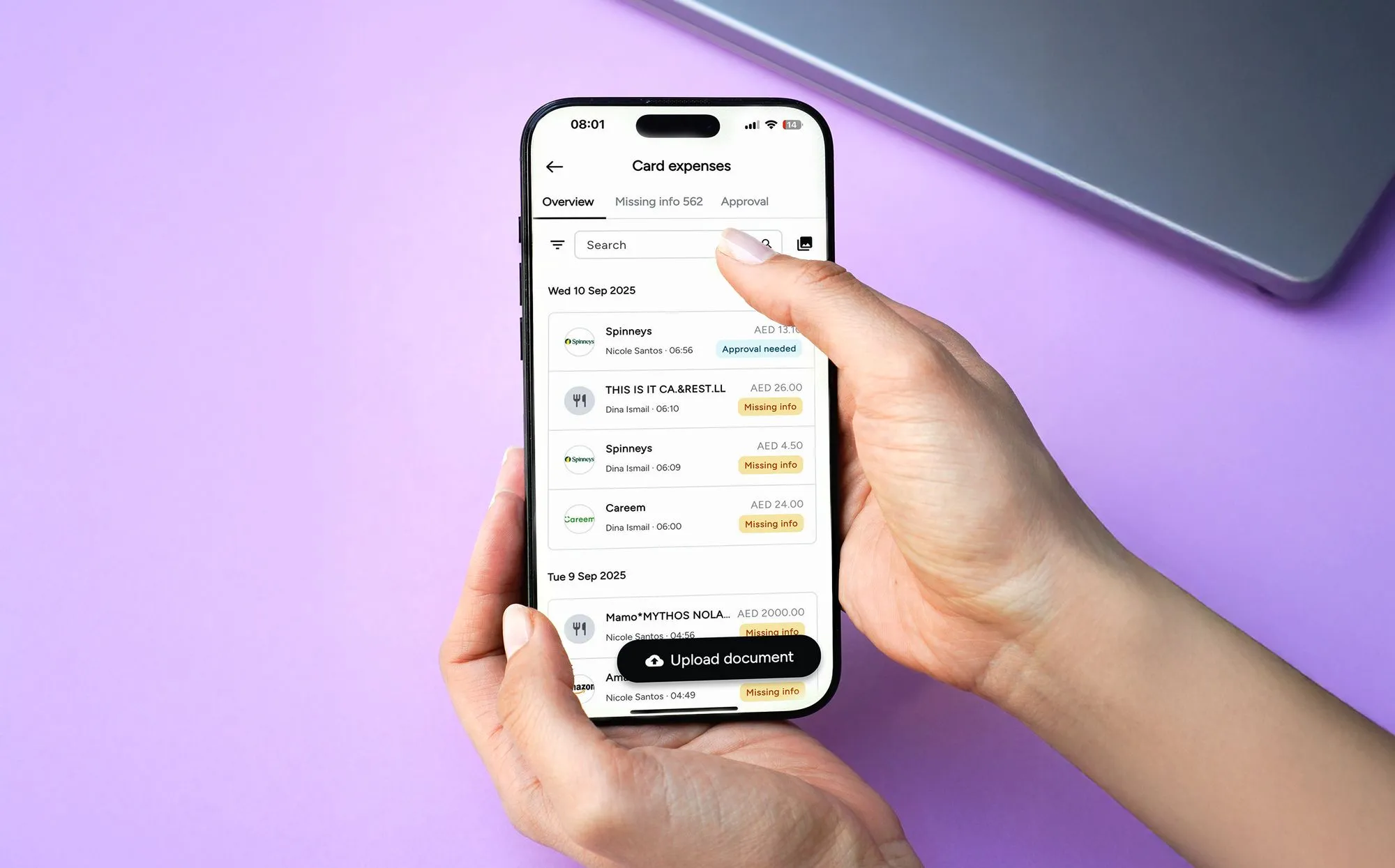
- Email forwarding: send invoices to your Pemo dashboard from whichever inbox received them, for a record dated the day the invoice landed.
- Automated data extraction: the vendor, the amount, the invoice number, and the due date come off the document without manual entry.
- Status tracking: every invoice shows where it stands, from submission through to approval.
- Central archive: every invoice stays searchable afterwards, whoever it first arrived with. Duplicate detection and VAT visibility sit on Premium, which is worth knowing if either is the control you're buying for.
Approvals follow your own reporting lines
Routing rules hold up when they match the way decisions already get made in your company:
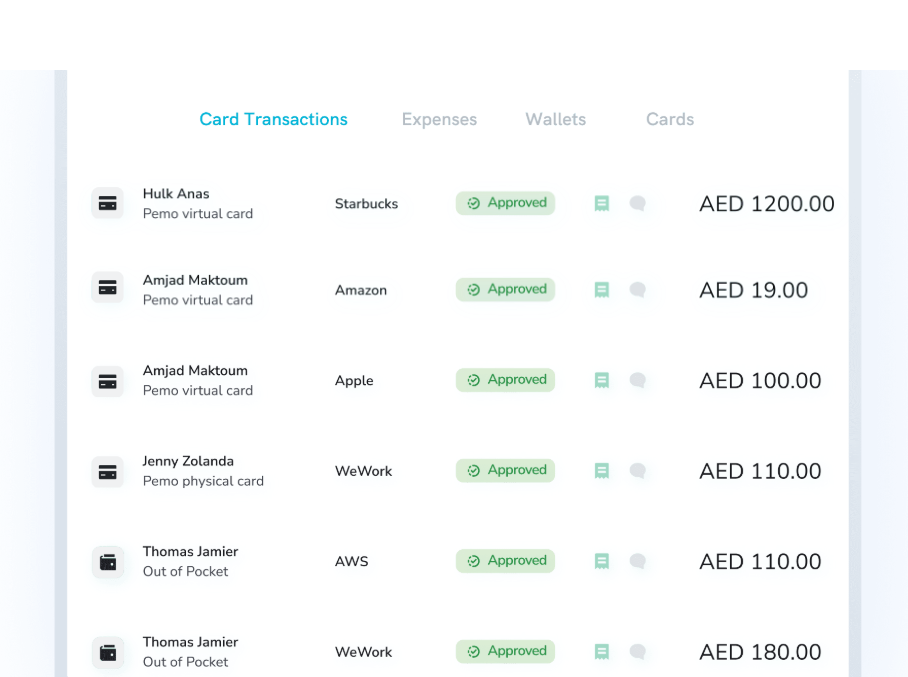
- Workflows built around your structure: configure the routing once, after which each new invoice follows the path you defined.
- Relevance filtering: approvers see the invoices that need them and nothing else.
- Full audit trail per transaction: the approval and the release stay attached to the invoice. When someone asks in November who cleared a June payment, the answer is already on the record.
- Review from anywhere: approve on desktop or on the phone, keeping a signatory in Riyadh from becoming a four-day delay.
- Multi-layer workflows: available on Premium, for commitments that need more than one signature. Default submission and approval policies are included on the free Starter plan.
Payment leaves from a wallet you fund
A lot of platforms treat the approval as the finish line. Here’s what you’re getting with Pemo:
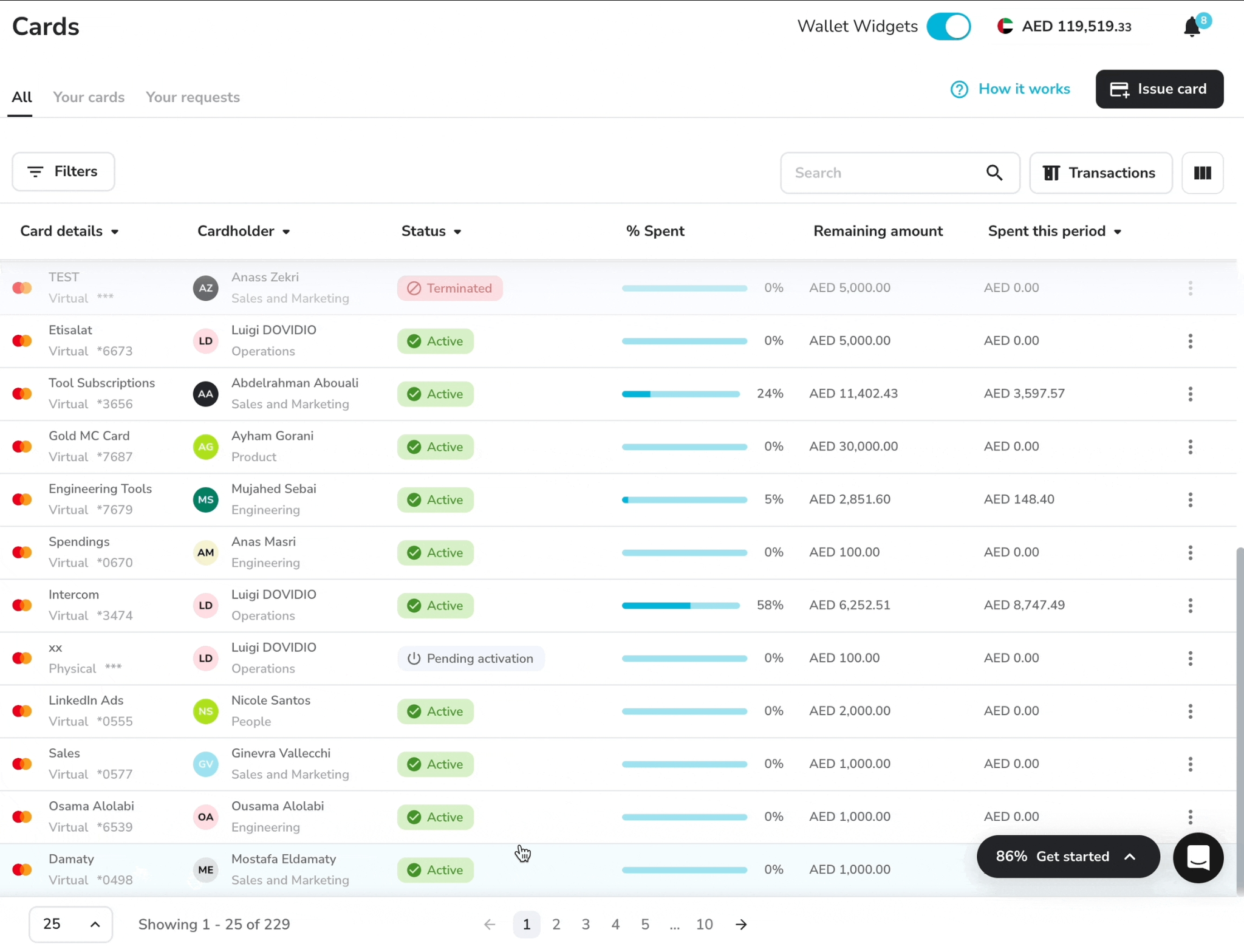
- Settlement from your Pemo wallet: pay approved invoices from a balance you've topped up, with a dedicated IBAN on the account across all plans.
- Scheduled disbursements: time the release to the due date, and an invoice never goes out late by accident.
- Wallet forecast: check your balance against what's already committed before you clear the next run.
- One session: the approval and the payment happen in the same place, with no separate banking login.
Pemo MCP: your spend data inside ChatGPT or Claude
Pemo now connects Claude, ChatGPT, Gemini, Copilot or any client that supports remote MCP servers to your live Pemo data.
You can ask for today's declined transactions, last month's software spend, a month-end summary, cards with no recent activity, or reimbursements submitted this week.
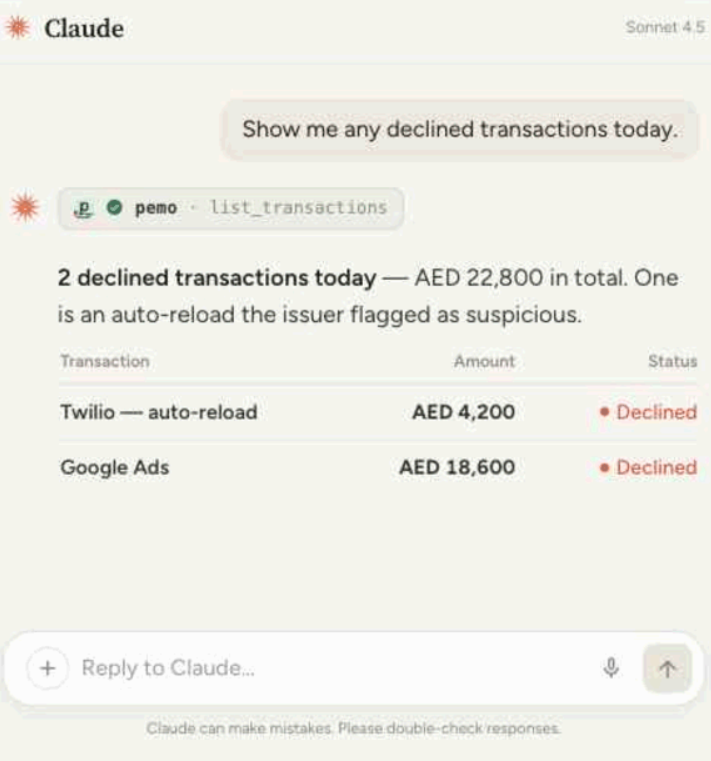
The connection is read-only, so nothing gets approved or changed from a chat window.
Cards show their last four digits only. Each person's Pemo role limits what their assistant can see.
Pemo's pricing
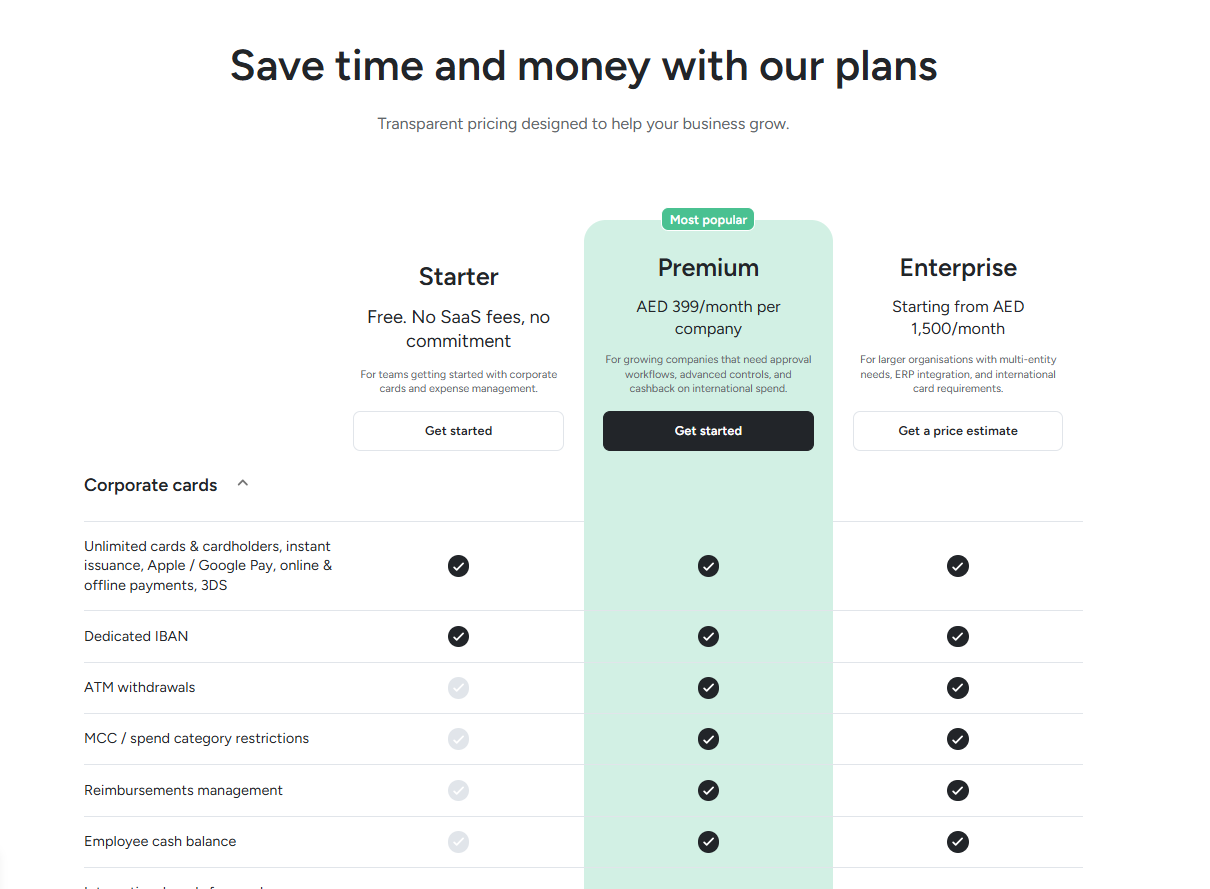
Pemo charges one company fee per plan, with no per-user pricing.
Every plan carries unlimited users alongside unlimited physical and virtual cards.
- Starter: free, with no SaaS fees and no commitment. Includes a dedicated IBAN, default submission and approval policies, AI Copilot coding, and the standard accounting integrations. Note that a foreign exchange fee of 3.68% including VAT applies to companies onboarded from 1 July 2026, so factor that in if a meaningful share of your suppliers bill in another currency.
- Premium: AED 399/month per company. Adds multi-layer approval workflows, advanced submission policies, three sub wallets, and the spend analytics dashboard.
- Enterprise: from AED 1,500/month. Adds multi-entity support, budgets, custom exports, custom ERP integration, developer API access, and a dedicated implementation manager.
Want to learn more? You can sign up for Pemo's free plan or book a demo to see it in action.
How do you tell whether the automation is working?
You want to take a baseline for one month before you change anything, otherwise you'll have nothing to compare against in March.
Four numbers are going to be enough:
- Cycle time: working days from the invoice arriving to the approval landing. This is the one that moves first.
- Touchless share: the proportion of invoices that reach an approver with no manual correction.
- Late payments: how many go out after the due date each month. Aim for zero within two cycles.
- Days to close: how long the month-end close takes. This moves last, usually after the coding has learned your accounts.
When cycle time drops and close time doesn't, look at the ledger connection first.
Get started with Pemo for free
The thing teams underestimate about automated accounts payable is how quiet it gets.
No forwarded chains asking whether an invoice was paid and no Sunday spent working out which of last month's invoices never reached the books.
Your part is one approval. The payment leaves on the due date, with the entry already coded when it reaches your books.
If you're looking for accounts payable automation for your UAE team that offers:
- An email address that turns supplier invoices into records, with the fields already read.
- Approval routing shaped around your reporting lines, with multi-layer sign-off where you need it.
- Payment released from a funded wallet with a dedicated IBAN behind it.
- Coded entries flowing into Xero, QuickBooks, Zoho Books, Odoo, Wafeq, or Mazeed.
Then you can sign up for the free Starter plan or book a demo to see why over 10,000 businesses across the MENA region run on Pemo.
⚠️ Disclaimer: This article was last updated on the 18th of August, 2026, and if there's any misinterpretation of the information, please contact us, and we will fact-check it.
Accounts payable automation FAQs
What is the difference between accounts payable automation and invoice management software?
Invoice management software organises the document. Accounts payable automation carries the whole obligation through to a paid, recorded transaction.
The dividing line is the payment.
A tool that gets the invoice approved then hands you back to your bank is managing invoices.
How long does it take to automate accounts payable?
For a small finance team with clean vendor data, a working setup is a matter of days.
Configuration is quick.
The slow parts are agreeing your approval thresholds and getting suppliers to bill the new address.
Budget a month of running both processes side by side before you switch the old one off.
Do you need an ERP to automate accounts payable?
No. Most UAE SMEs manage without one.
An ERP makes sense once your payables depend on purchase orders and stock receipts, because that three-way check needs procurement and inventory data in the same system.
For a company paying suppliers against invoices alone, a spend platform connected to your accounting software covers it.
Can you automate approvals without losing control of payments?
Yes. Separating the two is the point.
Rules decide the routing and clear the low-value items you have chosen to let through.
Everything above your thresholds still waits for a named person, and the money leaves a balance you funded yourself.
Multi-step approval chains put a second pair of eyes on the larger commitments, which is the separation an auditor will ask about.
Which invoices should stay manual?
Anything unusual enough that a rule would get it wrong.
A first invoice from a new supplier, a payment that doesn't match its purchase order, or an amount well outside that vendor's normal pattern. Those deserve a person.
Recurring charges you've approved a dozen times already don't.


