
TL;DR
- Manual approvals stall as you grow: chasing managers on WhatsApp and email works for a five-person team, then quietly eats finance hours once you scale.
- The usual methods run out of road: a verbal okay or a buried email thread lands the sign-off well after the money has already gone out.
- The fix is approval at the point of spend: a rule attached to the card that sends each transaction to the right approver before it clears, not three weeks later in a reconciliation.
- Pemo handles this for UAE teams: approval policies by team or merchant category, multi-step approver chains, and direct sync into Wafeq, Xero, QuickBooks, Zoho Books, and Tally.
Why is expense approval so hard to manage for UAE businesses in 2026?
Expense approval is hard in 2026 because most of it still happens after the spend, by hand, across tools that were never built to enforce a rule.
The purchase comes first.
The sign-off comes later, if it comes at all, usually as a reply buried in a thread or a thumbs-up in a chat.
That order is backwards, and it explains nearly every approval headache a UAE finance team runs into.
The pressure has built from two directions at once.
Headcount and spending are growing quicker than the processes meant to keep up, and a single team can be split between a Dubai mainland office and a free-zone entity, with a few remote hires around the Gulf.
In one week, that same company might approve a dollar SaaS renewal and a euro supplier invoice, each landing on a different person's desk.
Between them, every transaction needs a clean record of who approved it, and when.
Here's where the gap shows up day to day:
- A manager waves through a AED 6,000 supplier payment over WhatsApp, the message slides under fifty others, and nobody in finance hears about it until month-end.
- A purchase that should have needed two sign-offs gets one quick yes, and the second approver never sees it.
- A recurring charge clears every month with no approver attached to it, so it keeps billing long after the contract should have ended.
- Come audit season, half the approvals exist only as chat replies, and someone in finance loses a week piecing the trail back together.
One of these on its own is a shrug.
Put thirty people and twelve months behind them, and the bill comes due in spend that slipped through unapproved and finance hours lost to detective work, with leadership left deciding on numbers that closed late.
The real damage isn't the one payment that should have been caught.
It's the audit exposure and the slow closes. And it's the friction that builds between finance and everyone they keep having to chase.
Here's how UAE businesses tackle it today:
What are the different ways UAE businesses approve expenses today?
Most UAE businesses lean on one of four approaches, and each one tends to fit a particular stage of growth:
Let’s go over each method in more detail:
Method 1: Verbal and ad-hoc approvals
Verbal approval is the oldest method here, and it hangs on in plenty of small UAE businesses because it costs nothing and feels instant.
Someone needs to buy something, walks over or rings the manager, and gets a yes.
In a four-person office where everyone's within earshot, that's usually fine.
It starts to become a problem the moment the team grows, or anyone goes remote.
Nothing records that the approval happened.
So when finance reconciles, or an auditor asks who signed off on a payment, the only answer is whatever someone remembers.
Method 2: Email and chat approvals
Once "just ask me" stops scaling, the sign-off usually moves into email or a WhatsApp thread.
The request goes into an email or a WhatsApp message, the manager fires back a yes, and that reply becomes the paper trail.
Better than nothing, and for the odd sign-off here and there it does the job.
The problem is volume.
Approval requests get buried under everything else in an inbox, so the urgent ones wait while trivial ones get a fast reply.
The yes almost always arrives after the purchase has happened, which makes it a rubber stamp, not a control.
I've watched a finance lead scroll back through four months of chat to find a single "approved" for an auditor.
Method 3: Expense reports with manual sign-off
Reimbursements that come up often enough tend to get formalised into expense reports.
Someone pays out of pocket, fills in a report, attaches the receipts, gets a manager's signature, and sends it on to finance.
For irregular spending, say a one-off client dinner, the process is fine.
As the main way a team gets things approved, it can drag.
Reports come in late, often missing a receipt or two, so the chasing eats hours every week.
The books trail real spending, because the numbers only show up when people get round to filing.
Each approved line still becomes a manual journal entry, VAT and all.
The sign-off is genuine enough, but it's slow and quietly expensive in finance time.
Method 4: Approval workflows in a spend management platform
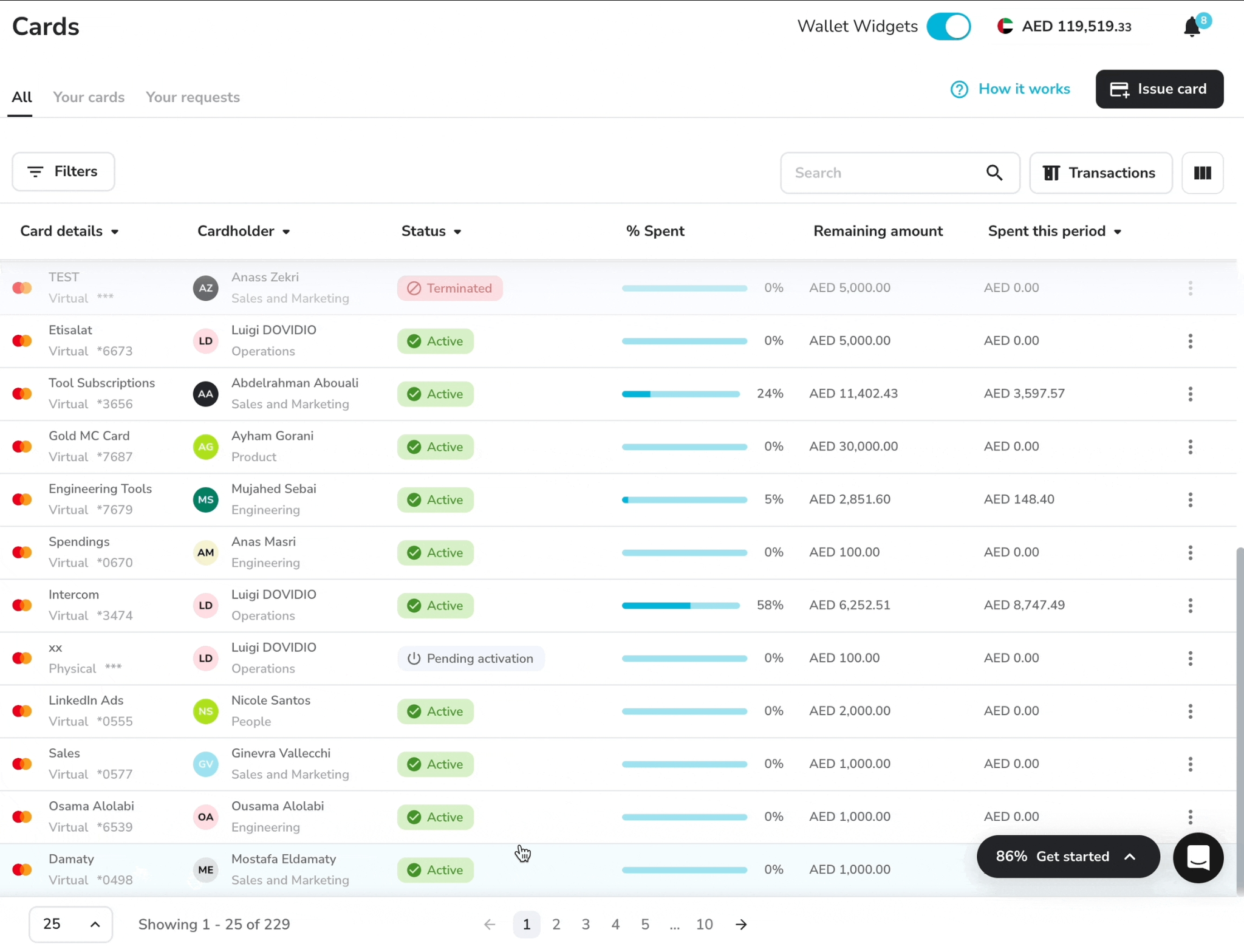
A spend management platform like Pemo (that’s us) attaches the approval rule to the card itself, so the sign-off happens before the money goes anywhere.
You set the policies once, and from then on each transaction is routed to the right approver, with anything outside the rules flagged or declined at the till.
- For the team, that means no more fronting cash and no more month-end receipt hunts.
- For the CFO, it means last month's numbers are knowable on the 1st, not the 20th.
Pemo suits a broad range of team sizes, from a two-person startup to a 200-person SME with named approvers, and the subscription usually pays for itself in saved finance hours.
For a team ready to drop the verbal okays and the buried-thread approvals and stop rebuilding the audit trail by hand, it's the setup that scales as your team grows.
What makes Pemo the best way to automate expense approval in the UAE?
Pemo gives UAE businesses the best way to automate expense approval by attaching the policy to the card, so every transaction routes to the right approver and clears your spending rules before any money moves.

Here are some of the features that brands like KIKO Milano, ADDMIND, and L’ETO appreciate: 👇
Approval policies by team or merchant category
Pemo lets you build approval policies two ways: by team or by merchant category.
When both could apply to one expense, merchant category wins, so there's never a question of which rule fired.
If nothing specific matches a transaction, a default policy picks it up, and nothing goes through unrouted.
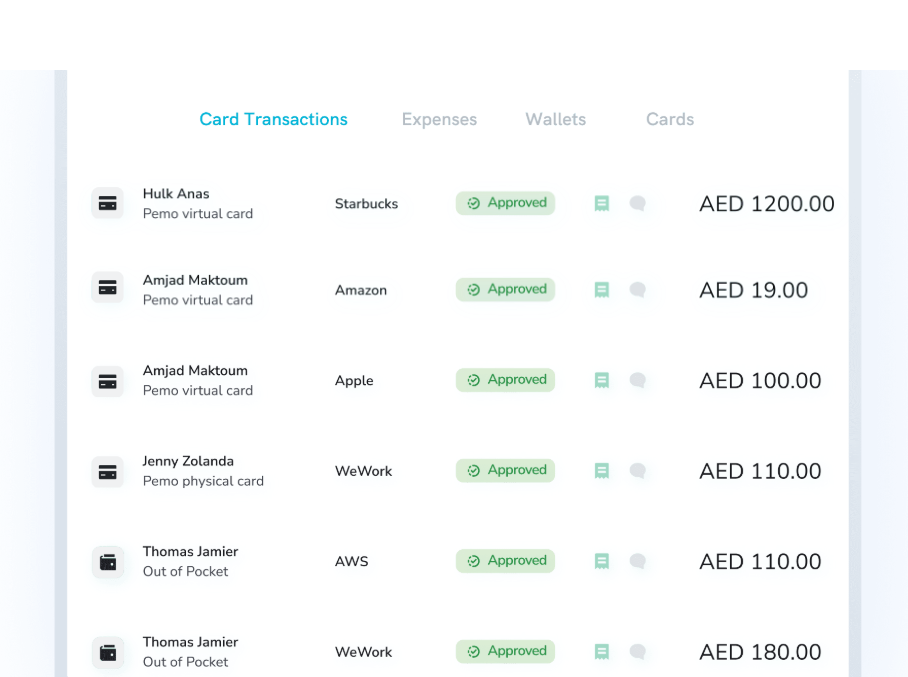
Each expense follows exactly one policy, so you're never untangling rules that contradict each other.
Multi-step approver chains tied to spend brackets
Approval in Pemo is set by spend bracket, with each bracket carrying its own approver.
You might let anything under AED 100 clear on its own, then send everything above that to a named approver first.
A single policy holds up to three rules, each with multiple steps inside, so a big-ticket payment can pass through more than one set of hands before it clears.
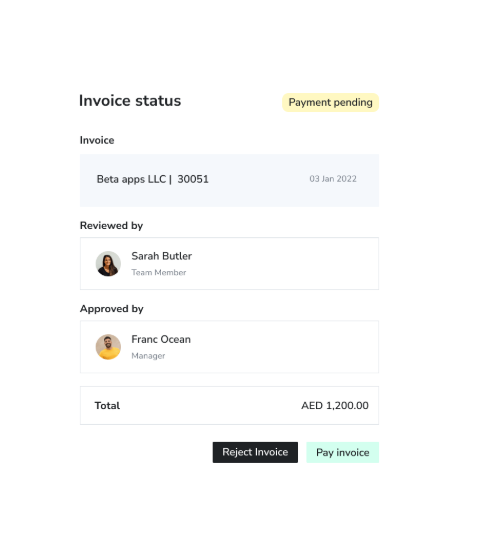
Approvers can be specific people or whole roles, like Admin or Accountant, which keeps things moving when someone's on leave.
Approvals are enforced before the money leaves
The rule rides on the card and not on a PDF nobody opens.
When a transaction needs a sign-off, the admin gets pinged the instant it happens, and the cardholder hears back the moment it's approved, declined, or flagged.
You can cap a card for advertising at AED 8,000 for the month, and at AED 8,000 it stops.
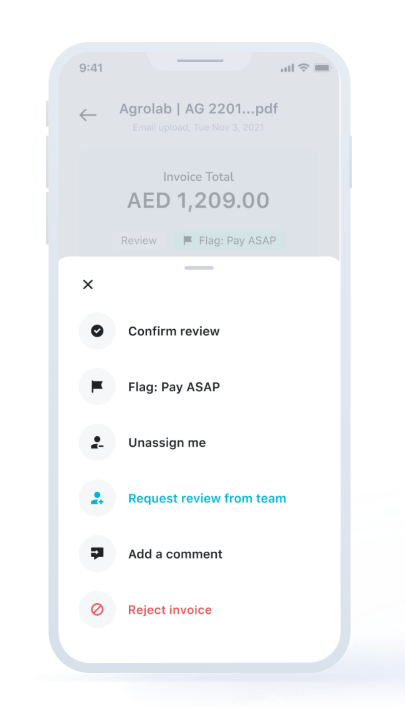
A written policy can name that limit. Making it bite at the checkout is the harder part, and that's what Pemo's card-level rules do.
Pemo's pricing
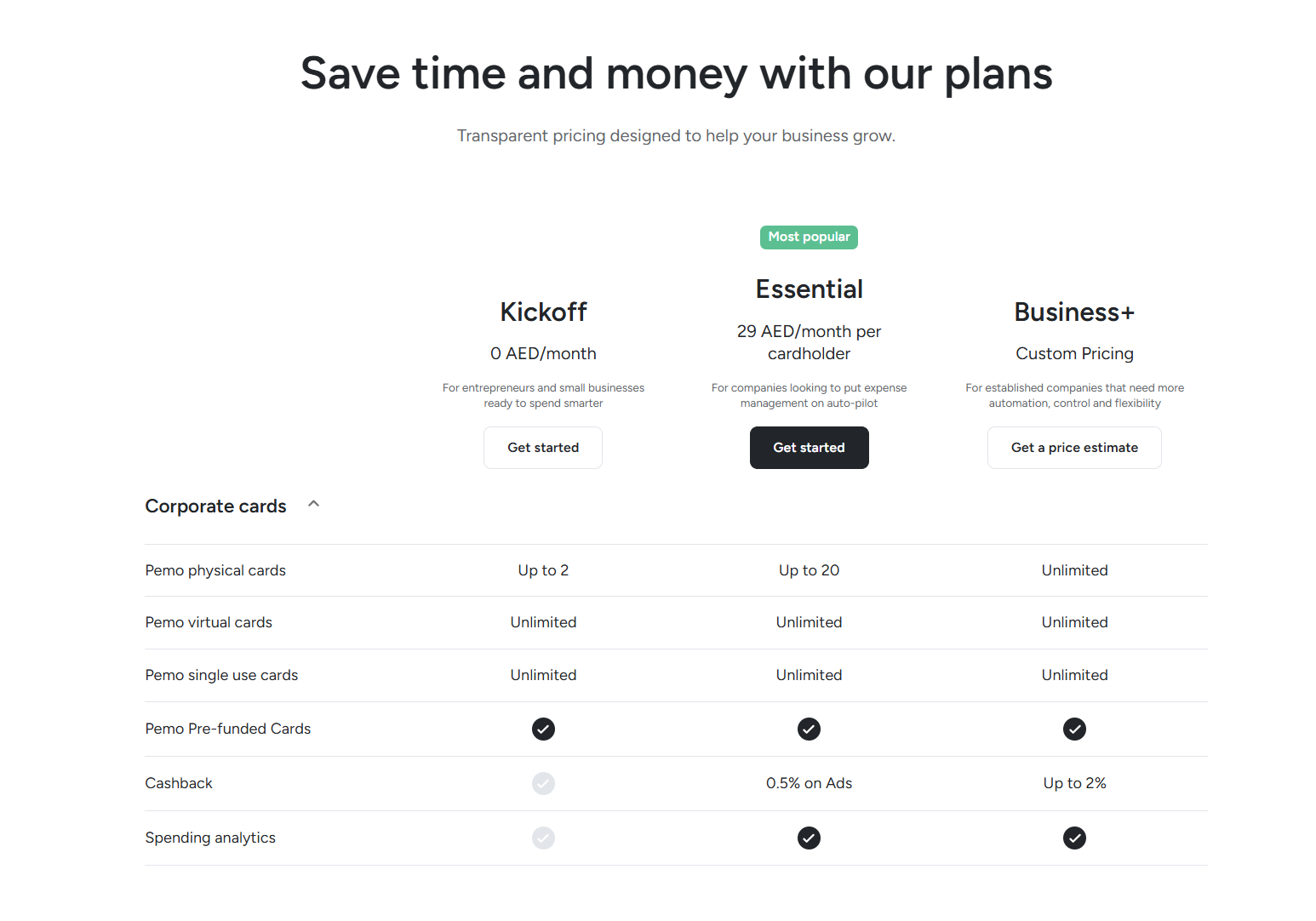
Pemo has a free plan and two paid tiers, billed by the number of card users.
- Kickoff (free, AED 0/month): up to 2 card users, unlimited virtual and single-use cards, expense management, AI receipt matching, and accounting integrations. Approval workflows aren't part of this plan.
- Essential (AED 29/month per cardholder): adds the approval workflows this guide is about, plus spend analytics, multiple wallets, advanced card controls, and 0.5% cashback on online ad spend.
- Business+ (custom pricing, from 20 card users): adds up to 2% cashback, a dedicated customer success manager, custom onboarding, priority support, and unlimited physical cards.
How does Pemo automate the accounting side of approved expenses?
Once an expense is approved, Pemo codes it and pushes it into your accounting software on its own, so the sign-off and the bookkeeping stop being two separate jobs.
The coding runs on Pemo Copilot, the AI engine behind every Pemo transaction.
The moment a payment clears, Copilot tags it: it sets the chart-of-accounts line and the vendor, then applies the right VAT treatment.
It also pays attention to your team's corrections, so a fix you make today becomes a sharper guess next week.
A few months in, most transactions are coded correctly on the first pass, and your bookkeeper moves from typing entries to checking them.
That coded data then flows into whichever platform you already run on:
- QuickBooks.
- Xero and Zoho Books.
- Wafeq.
- Tally.
Get started with Pemo for free
For years, approvals at most UAE companies ran on a patchwork of verbal okays, quick email replies, and signed expense reports.
That held up when the approver was sitting ten feet away and the company billed in a single currency.
The way businesses run here in 2026, with quicker growth, teams in more than one location, and corporate tax and VAT on the books, has left approval-by-message behind.
Pemo moves the decision onto the card.
The rule clears the spend before it happens, and the right person signs off in the app. The approved expense then lands in your books already coded.
If you're looking for expense management software with smart corporate cards for your UAE-based team that offers:
- Approval policies by team or merchant category, with multi-step approver chains.
- Rules enforced before purchase, not flagged weeks later in a reconciliation.
- Direct sync with QuickBooks, Xero, Zoho Books, Wafeq, and Tally.
- AED pricing that starts free, with paid plans from AED 29 a month per cardholder.
Then you can sign up for the free Kickoff plan or book a demo to see why over 10,000 businesses across the MENA region run on Pemo.
Expense approval FAQs
What is an expense approval workflow?
An expense approval workflow is the set of rules that decides who has to sign off on a purchase before it counts as approved.
A solid one sets the spend levels that trigger a review and names who approves each, then keeps a record of every decision for later.
Get it right and out-of-policy spending gets caught before the money moves, not after the fact.
How do you automate expense approvals for a UAE business?
You automate them by taking the rules off paper and attaching them to the card, through a spend management platform.
With a tool like Pemo, you set the policies once, each transaction routes itself to the right approver, and approved spend syncs into your accounting software on its own.
The manual parts, the chasing and the month-end trail-rebuilding, fall away.
Can you set different approval rules for different teams or spend categories?
Yes. Pemo lets you build policies at the team level and at the merchant-category level, and merchant category takes priority when both apply.
Every policy carries its own brackets and approvers, so procurement and marketing can run on entirely separate rules.
Do I still need approval software if I already have a corporate bank card?
For a very small team, maybe not. Once you're past about five people buying things regularly, the gaps start to show.
Bank cards rarely give you per-person approver chains, category rules, and a live record of every decision in one place, so plenty of teams find it easier to run the card and the approvals on one platform like Pemo.
What's the most common mistake when automating expense approval?
Routing everything for a sign-off, which quietly rebuilds the bottleneck you were trying to remove.
When every AED 30 taxi needs a manager's approval, the queue piles up, and people start rubber-stamping to clear it.
The teams that get this right approve by exception, not by default.
They let low-value, low-risk spend clear on its own, and save real sign-off for the transactions that carry weight, like a new vendor or a payment outside the usual pattern.
That's the whole reason spend brackets exist, and it's why an AED 0 to AED 100 tier that clears automatically is often the most useful rule in a policy.
You can set your thresholds where a wrong call would actually hurt, and leave everything below that alone.


