
TL;DR
- Receipt scanning is two jobs under one name: reading the document, and connecting that reading to the payment it describes.
- UAE receipts fail in specific ways, from bilingual thermal prints and faded paper to service charge lines that split the total into several candidate amounts.
- Some receipts should never be scanned at all, because recurring ad and software invoices can be routed straight to a receipt inbox address and skip the capture step entirely.
What is receipt scanning?
Receipt scanning captures a receipt as an image or a file, then pulls its contents into structured fields a finance system can read: the merchant, the date, the total, the currency, and the last digits of the card used.
That definition hides a split worth understanding before you buy anything:
Reading the document and working out which payment it explains are two different problems, and most vendors solve the first one thoroughly then market it as both.
If you buy on extraction accuracy alone, you’ll get a tidy pile of data with no idea which charge each item explains, which leaves your team working down a statement by hand.
How does receipt scanning work, step by step?
A scan moves through five stages, and each stage can fail on its own without breaking the others:
- Capture: the receipt enters the system as a phone photo, a file upload, an email attachment, or a forwarded message.
- Clean-up: the image gets cropped, straightened, and contrast-corrected before any reading happens. For a receipt photographed at an angle on a dark table, this stage decides the outcome more than the reading engine does.
- Extraction: optical character recognition converts pixels into characters, then a document model decides which of those strings is the total, the date, or the merchant name.
- Matching: the extracted values get compared against payment records to find the charge the receipt explains, with amount and date doing most of the work and merchant name breaking ties.
- Verification and filing: the document gets checked against the matched transaction, then stored against it with a timestamp and an audit trail.
Basic OCR stops after extraction and hands you text, while intelligent document processing adds the field-level judgment, which is how two tools reading an identical receipt return very different results.
Which channels do business receipts arrive through?
Receipts reach a finance team through five channels, and sorting your volume by channel beats sorting it by device:
- Point-of-sale paper: thermal prints from restaurants, fuel stations, hardware suppliers, and taxis, the only channel that genuinely needs a camera.
- Emailed PDFs and e-receipts: ad platforms, software vendors, airlines, and hotel bookings, all arriving machine-readable already and needing routing more than photography.
- Chat app forwards: UAE teams already send photos of bills over WhatsApp to whoever handles finance, so the photo exists and simply lands in the wrong place.
- Supplier invoices: documents tied to a purchase order or a bank transfer, which follow an approval path of their own.
- Cash purchases with no document: the small runs where a driver or an office manager comes back with change and a verbal explanation.
Many SMEs assume the paper is the problem, and that is understandable, because paper is the visible part of it.
Count a month's volume and the emailed receipts often outnumber the paper ones, which points to a very different fix.
Is receipt scanning efficient?
Yes for extraction, no for matching. Scanning removes the data entry and leaves the reconciliation exactly where it was.
Time your own process and the split shows up immediately.
As an illustration, take a 25-person company generating 300 card and cash purchases a month, of which 260 come back with a receipt, and 40 do not.
Photographing those 260 at ten seconds each costs about 45 minutes.
Keying the merchant, the date, and the total by hand at 20 seconds a receipt adds an hour and a half, so capture and entry together run to a little over two hours.
Matching is the expensive part, and at a minute per receipt against a statement at month-end, that is a further four hours and change.
The 40 missing ones add roughly two hours on top, at a couple of messages and a follow-up each.
Scanning software removes the data entry almost entirely and leaves the matching and the chasing exactly as they were.
Swap in your own volumes and per-receipt timings, and the ranking rarely moves.
Efficiency therefore rests on one condition, which is whether the payment record already exists at the moment the receipt lands.
Create the transaction first, and matching runs quietly in the background, leaving the reading as the only manual step in the chain.
Without that, a scanner buys you a faster typist and an unchanged month-end.
Where does receipt scanning break down on UAE receipts?
Extraction accuracy drops on several document types common in this market.
- Bilingual receipts: Arabic and English in parallel columns give the field detector two candidate merchant names and two labels for every line.
- Degraded thermal paper: a receipt that spent a July afternoon on a dashboard in Dubai comes back either darkened across the whole sheet by the heat or bleached by the sun, and either way the total stops being readable.
- Stacked totals: subtotal, 10% service charge, 7% municipality fee at hotel-licensed venues, 5% VAT, and grand total printed in sequence give five plausible amounts, and picking the wrong one creates a mismatch nobody notices until reconciliation.
- Duplicate captures: a restaurant bill photographed at the table and emailed to the cardholder an hour later arrives twice, from two channels, and a tool that does not spot it either files two copies against one expense or invents a second expense that never happened.
- Misread reference numbers: a long order or terminal number printed beside the total gets picked up as the amount, which sends the match to the wrong transaction or to none at all.
- Handwritten supplier receipts: small vendors still issue them, and handwriting recognition is far weaker than print recognition.
- Foreign currency receipts: the figure on the paper will not equal the figure that cleared, because conversion happens after the purchase, so a straight amount comparison flags a problem that is not there.
That last one separates a checking step that helps from one that generates noise.
A receipt for 452 euros that cleared at roughly AED 1,960 is almost certainly correct, once you allow for a spot rate around 4.18 and the card's foreign exchange fee on top. A tool that only compares numbers will flag it as a mismatch anyway.
Any verification worth having reads the currency alongside the amount, which is a question to put to a vendor before you buy.
When is receipt scanning not worth doing?
Receipt scanning stops being worth the effort when the document can reach your finance system without a human touching it.
Recurring digital spend is the clearest case.
Meta lets you add invoice recipients directly in Payment Settings, and most software vendors have the same field in their billing settings.
Point it at a receipt inbox address and the invoice arrives on its own every cycle, for as long as the subscription runs.
Google Ads and TikTok are narrower, as email invoice delivery there is tied to monthly invoicing rather than card billing, so on a self-serve card account you get the same result with a forwarding rule in whichever mailbox receives the receipt.
Pair that with a virtual card dedicated to a single recurring supplier and the match becomes close to trivial, because that card carries one vendor's charges and nothing else.
Merchant and category restrictions of this kind sit on the paid tiers, so check your plan before relying on them.
For everything else, weigh the staff minutes a receipt costs to process against the value of the purchase.
A recurring AED 180 charge from the same vendor every month deserves a structural fix, and scanning it faster will never produce one.
For a one-off AED 4,000 payment to a supplier you will never deal with again, a single-use virtual card covers the online version and a photo at the till covers the in-person one, and either way that is the whole answer.
How does Pemo handle receipt scanning?
Pemo puts capture, matching, verification, and the accounting sync on top of the card that paid for the purchase, so for card spend the expense record already exists by the time any receipt shows up.
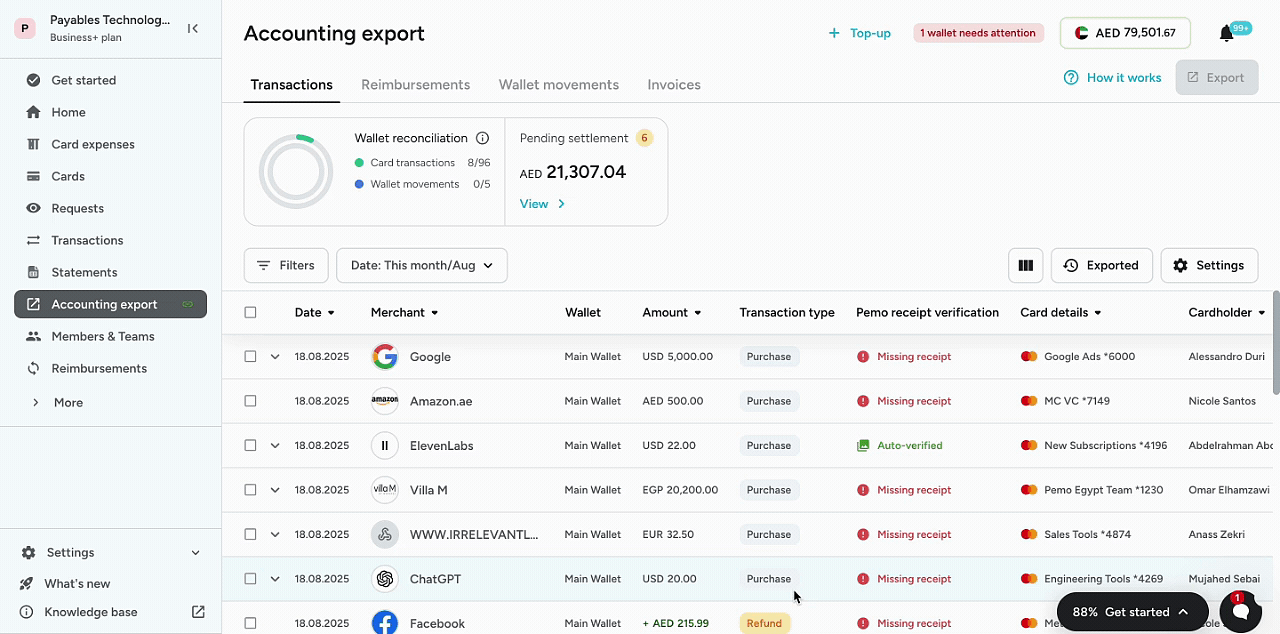
Let’s go over how Pemo works for UAE teams:
How does Pemo capture receipts?
Capture runs through four channels, so the receipt goes wherever the cardholder already is:
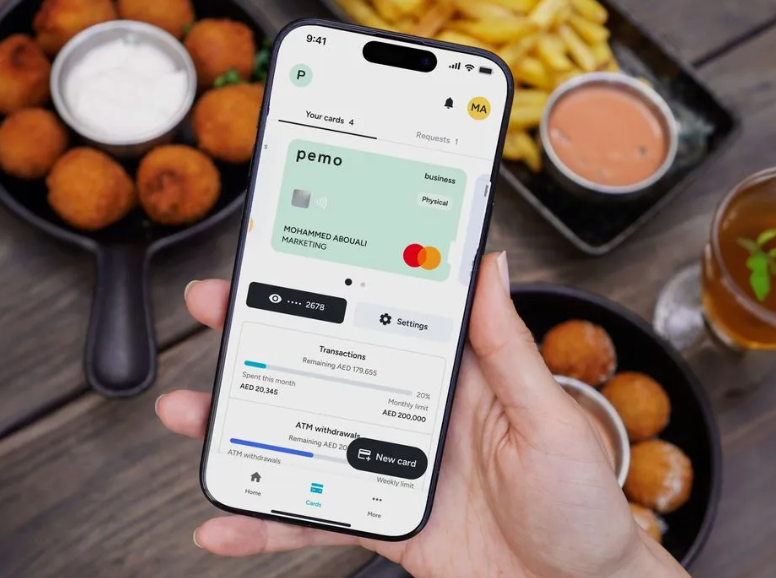
- In-app photo: the transaction appears in the app as soon as the card clears, and the cardholder snaps the receipt at the counter.
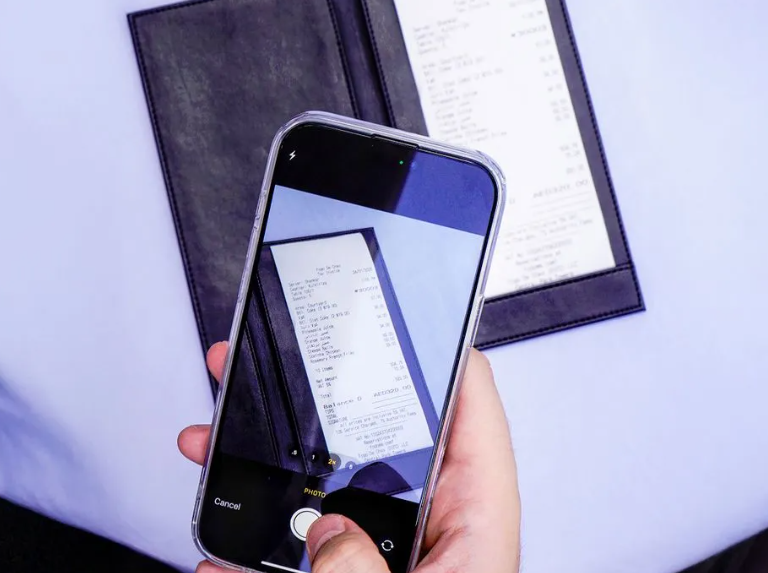
- Email forwarding: every cardholder gets a personal Pemo inbox address, and anything forwarded to it gets matched automatically.
- WhatsApp: send the photo to Pemo's WhatsApp number and it goes into the same queue.
- Bulk upload: drag a batch into the Receipts Inbox when paper has piled up.
➡️ Receipt capture, OCR matching, and verification are included on every plan, the free Starter tier included.
How does Pemo match a receipt to the right transaction?
A Pemo card transaction appears as an expense the instant the card is used, which means every incoming receipt has a set of live transactions to attach itself to.
Each receipt lands in the Receipts Inbox carrying a status.
A matched receipt has found its expense and needs nothing further from anyone.
Unmatched signals that the details were unclear, or that several similar expenses competed for it, and you can link it by hand in a few clicks by searching the expense list by date.
A third status, Duplicate, flags the same document arriving twice for you to confirm, which happens more than finance teams expect once receipts come in from four channels.
A fourth, File Error, catches an unsupported or corrupt file so it does not sit in the inbox unread.
After 15 days, a matched receipt leaves the inbox and stays attached to its expense in the Expenses tab, so the audit trail survives the housekeeping.
What does Pemo's receipt verification check?
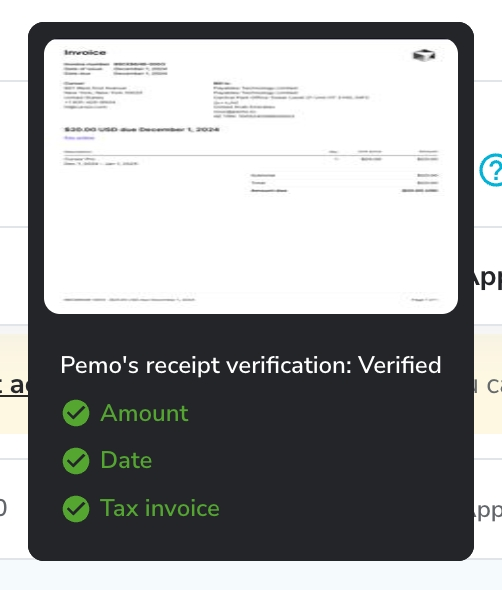
Verification compares the document against the transaction it matched to, and it runs three checks rather than one.
The amount and the currency are matched against the expense, which is what stops a foreign currency receipt being flagged as a mismatch for no reason.
The receipt date is checked against the transaction date.
The document is checked for whether it qualifies as a valid tax invoice, which is the check that decides whether you can recover the VAT.
Each expense then reads as auto-verified, unverified, or receipt missing, so the gap that needs closing is named rather than left for month-end.
An auto-verified expense needs nothing further, and that accounts for most of the saving at close.
Sign up for Pemo for free
If your receipts already arrive attached to a transaction record and your unmatched pile clears itself, your process is working, and better scanning software will change very little.
If month-end still opens with a bank statement and a folder of photos, the problem is upstream of your scanner, and no scanner will reach it.
Pemo gives you the card, creates the expense the moment it clears, checks the receipt against it, and pushes both into your accounting file already coded.
You can sign up for Pemo's free plan or book a demo to see why 10,000+ businesses in the MENA region have chosen us.
⚠️ Disclaimer: This article was last updated on the 31st of July, 2026. It covers receipt handling and expense workflows as general information, not tax, accounting, or legal advice, so confirm anything affecting your filings with a qualified adviser. Product features and plan availability change, so check current plan details before relying on them. If you spot something that needs correcting, contact us, and we will review it.
Frequently asked questions
What is the difference between receipt scanning and receipt matching?
Scanning reads the document and turns it into data, while matching decides which payment that data explains.
A tool can be excellent at the first and offer nothing on the second, which is a gap worth checking for before you buy.
How accurate is receipt OCR in 2026?
On clean printed receipts in a single language, extraction of the merchant, the date, the total, and the currency is reliable enough that review becomes a spot check rather than a line-by-line one.
Accuracy falls on faded or heat-damaged thermal paper, on handwriting, on bilingual layouts, and on anything photographed in bad light.
So the useful question to ask a vendor is what their tool does when a field cannot be read at all.
Can receipt scanning handle receipts in Arabic?
Arabic text recognition works, and bilingual receipts are the harder case because the same fields appear twice in two scripts.
Test any tool on your own suppliers' receipts before you commit, since results vary by layout more than by language.
Do I need a desktop scanner for business receipts?
Many no longer do, since phone cameras with decent image clean-up handle day-to-day volume and dedicated hardware tends to pay off only when you are digitising an archive in bulk.
Check where your receipts originate first, because the emailed ones never needed a scanner.
What happens to receipts that never get submitted?
They become the real cost of the process, because every missing receipt turns into a chase, and the chase happens weeks later when nobody remembers the detail.
Systems that flag a missing receipt the same day close this gap far more effectively than systems that produce a month-end list.


