
In this guide, I’ll go over AI business bank accounts, including what they are and how they work in the UAE.
TL;DR
- An AI business bank account is a licensed UAE business account with an IBAN in your company's name, run through software that reads invoices, routes them for approval, flags payment risks, and places idle balances into deposits on your instruction.
- The AI reads and codes; automated checks flag; people release: invoice details are extracted from an uploaded file or a forwarded email, transactions are coded for your accounting software, then a designated Payment Order Authorizer signs off every payment with a one-time SMS code.
- The Pemo Business Account is issued by ruya, a UAE-licensed Islamic bank, and pairs Bill Pay payables automation with automated pre-payment checks and Wakala deposits carrying an expected profit rate of up to 3.75% a year on the 3-month tenor.
What is an AI business bank account?
An AI business bank account is a regular business bank account, held at a bank licensed by the Central Bank of the UAE, with a software layer that automates the payables and the bookkeeping around it.
That layer can be built by the bank itself or by a fintech partner.
The word "AI" refers to the software layer.
Your money is held in a regulated UAE bank account that carries your company's name and its own IBAN.
Which part is the bank and which part is the software?
The bank holds the money and the licence; the software decides how the work gets done before any of that money moves.
In the Pemo Business Account, ruya provides:
- The account itself: a UAE business bank account, IBAN included, registered to your company.
- Wakala deposits: the Shari'ah-compliant term deposits your idle balance can be placed into.
- Cheque clearing: cheques collected by ruya's courier partner JMBR are cleared at the bank.
- A regulated account: the account is a regulated product, which is why documents are needed at opening.
Pemo provides:
- Bill Pay: the accounts payable workflow that turns an uploaded invoice into an authorised payment.
- Approval policies: the routing rules set by your admins and accountants before a bill can be released.
- Fraud flags and the audit trail: the checks that run before money leaves, plus the log of every action.
- The Card Wallet: the separate prepaid pool that funds Pemo corporate cards.
How is an AI business bank account different from a conventional business account?
Both kinds of accounts hold your money at a licensed UAE bank, registered to your company.
What changes is the work around the account?
Here’s what that looks like:
Note: The conventional column describes common practice, not any single bank.
For a wider look at what UAE banks offer, see our guide to the 10 best business bank accounts in the UAE.
What does the AI in an AI business bank account do?
The AI reads invoice details off an upload and codes transactions for your accounting software.
Automated controls then route bills through your approval policy and raise fraud flags before a person releases the money.
How does the AI handle bill payments?
Bill Pay handles accounts payable inside the Pemo Business Account.
An invoice goes from upload to paid in six steps.
- Upload: photos and file uploads both work, as does forwarding the supplier's email to Pemo.
- Extraction: Pemo's AI reads the invoice details. Nobody keys in a beneficiary or an amount.
- Routing: the bill follows the Bill Pay approval policy set by your admins and accountants under company settings.
- Release: once approved, your Payment Order Authorizer signs off the payment by entering a one-time code sent by SMS. The money then leaves the Business Bank Account.
- Notification: the vendor receives an email once the payment is made.
- Sync: the bill syncs to QuickBooks, Zoho, or Xero with its status set to paid.
Several approved bills can go out together as a batch, which the Payment Order Authorizer releases with a single authorisation.
Local transfers move on Aani, the UAE's instant payment network.
Anything below AED 50,000 usually arrives within minutes during business hours, though standard compliance checks can add a short delay.
How does the AI handle the bookkeeping?
Pemo Copilot codes each transaction as it arrives, filling in the chart of accounts category and the vendor.
This layer belongs to the wider Pemo platform, on every plan, and covers card spend and expense claims as well as the account.
- Auto coding: Pemo Copilot assigns the chart of accounts category and vendor to each expense. Any suggestion can be changed; they improve as Copilot learns your patterns.
- Receipt matching: AI Copilot verifies receipts and matches them to transactions.
- Vendor creation: new vendors are created automatically.
- Accounting sync: the platform integrates with Xero, QuickBooks, Zoho Books, Odoo, Wafeq, and Mazeed, with data flowing across without manual uploads.
Bills paid from the account itself follow the narrower route described above, syncing to QuickBooks, Zoho, or Xero with the status set to paid.
How does an AI business bank account detect fraud?
In the Pemo Business Account, fraud checks run automatically before any money moves.
Four controls stand between that bill and your balance in the Pemo Business Account.
- Duplicate bill flag: a bill that has already been submitted is flagged the second time it appears.
- First-time vendor flag: the first payment to a vendor you haven't paid through the account before gets flagged.
- IBAN mismatch flag: a mismatch in the IBAN raises a flag before anything goes out.
- One-time SMS code: the Payment Order Authorizer confirms every release with a code sent by SMS.
Whoever prepares a payment can't release it. A team member or an accountant builds the payment for an approver to sign off.
The money stays put until the designated Payment Order Authorizer enters the code.
Each action taken on a payment is written to an audit trail.
What does the AI not do?
In the Pemo Business Account, the AI reads invoices and codes transactions; automated checks raise the flags. Money moves only when a person releases it.
- Releasing funds: every payment waits for your Payment Order Authorizer's code. The AI never sends money on its own.
- Placing deposits: you choose the tenor and move idle funds into a Wakala deposit yourself, in a few clicks. Nothing is invested automatically.
- International vendor payments: outgoing transfers are AED-only and stay inside the UAE for now. International payments are a roadmap item.
- Partial payments: a bill can't yet be split into staged payments. Partial payments are on the same roadmap.
How does an AI business bank account pay expected profit on idle funds?
Whether idle funds return anything depends on the bank behind the account.
In the Pemo Business Account, idle funds are placed into Wakala deposits held with ruya. A Wakala deposit pays an expected profit at maturity; the arrangement doesn't involve interest.
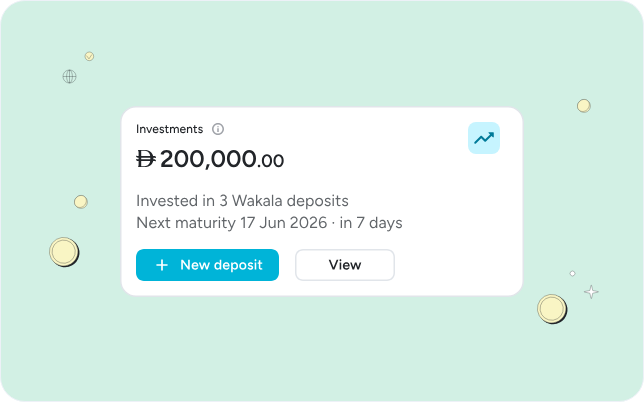
In the Pemo Business Account, those deposits are held with ruya.
What is a Wakala deposit?
A Wakala deposit puts the bank in the role of agent.
Your company commits a sum for a fixed term, with the bank investing it on your behalf and paying you an expected profit when the term ends.
It's the Islamic banking counterpart to a fixed deposit.
The rate is an expected rate. Actual profit can vary with market conditions.
How much can a business expect to receive?
With the Pemo Business Account, up to 3.75% expected profit a year, with the rate set by the tenor you pick.
The Pemo Business Account offers six tenors through ruya:
Deposits start at AED 5,000 and go up to AED 5,000,000. Profit is paid when the deposit matures.
Early termination is possible, at the cost of the profit.
Partial redemption isn't available.
➡️ AED 500,000 placed for three months at the 3.75% rate comes to roughly AED 4,690 of expected profit at maturity on a simple three-twelfths calculation. ruya's own terms govern the exact figure.
Note: Rates are set by ruya under its terms and conditions. The figures above are estimates that can change with market conditions.
How do you open an AI business bank account in the UAE?
You apply to the provider and submit your company documents.
With the Pemo Business Account, the account typically opens within 1 to 3 business days once everything is in, with no branch visit involved.
For the Pemo Business Account, the process runs as follows:
- Apply: start the application from the Pemo Business Account page (open an account).
- Submit documents: documentation is a Central Bank of the UAE requirement for a regulated bank account. Pemo's and ruya's compliance teams assess it case by case. Bank statements are optional at this stage.
- Wait for approval: typically 1 to 3 business days from the point your document set is complete.
- Fund the account: send funds to the new IBAN from an existing account, or share the IBAN with customers and let their payments arrive directly.
- Set up controls: confirm who your Payment Order Authorizer is and set the Bill Pay approval policy in company settings.
- Connect your accounting software: once linked, paid bills sync across automatically.

An existing corporate bank account isn't a prerequisite. The Pemo Business Account can be a company's first business bank account.
Opening is free of charge. No minimum or maximum balance applies.
What does an AI business bank account cost in the UAE?
The Pemo Business Account lists at AED 200 per month, cut to AED 99 per month at the current discount, with AED 0.50 local transfers and no opening fee or minimum balance.
The fee schedule as published:
- Subscription: AED 200 per month list price, AED 99 per month at the discount running at the time of writing. The first 100 companies to open an account have the subscription waived through the end of 2026.
- Opening and balances: no opening fee, no minimum balance requirement.
- Local transfers: AED 0.50 all-in per transfer, made up of an AED 0.47 fee and AED 0.03 of VAT.
- Cheque collection: AED 15.75 per collection request through ruya's courier partner JMBR.
- Post-dated cheque lodgement: AED 10 plus VAT per cheque.
- Wakala deposits: from AED 5,000 to AED 5,000,000 per deposit.
The account subscription is listed separately from Pemo's spend management plans.
You can apply to open an account or book a call with our team if you'd like to see Bill Pay run against your own invoices first.
Who should open an AI business bank account?
An AI business bank account fits a UAE company that pays vendors by invoice and wants the approvals and the bookkeeping handled in the same place as the account.
Fit beyond that depends on the provider. For the Pemo Business Account, a strong fit would be:
- Companies with a monthly supplier run: a batch of approved bills released with one authorisation replaces a queue of individual transfers.
- Companies holding cash between payment runs: a balance that would otherwise be idle can be placed for as little as one day.
- New companies: the account can be a company's first business bank account, opened with no branch visit.
- Teams that want separation of duties from day one: the account enforces it, with preparation and release in different hands.
Not the right fit for the Pemo Business Account yet:
- Businesses paying vendors abroad: the Pemo Business Account's outgoing transfers are AED-only within the UAE for now.
- Businesses on staged payment terms: partial payments aren't available in the Pemo Business Account yet.
💡 On our roadmap, we’ve got WPS salary payments and scheduled payments, plus payment links and international payments.
Next steps: open a Pemo Business Account
Before you open an AI business bank account, confirm four things with the provider.
The Pemo Business Account's answers are listed against each one.
- The licence holder: ruya, an Islamic bank licensed by the Central Bank of the UAE, holds the account. Pemo runs the platform.
- The person who releases money: one designated Payment Order Authorizer, who enters an SMS code on every payment.
- The treatment of idle cash: Wakala deposits from AED 5,000, expected profit of up to 3.75% a year, paid at maturity.
- The cost to open and run: no opening fee, no minimum balance, AED 99 per month at the current discount, AED 0.50 per local transfer.
If those answers work for your company, you can start an application today.
Or book a call with a real supplier invoice to hand, and ask to see Bill Pay work through it.
Disclaimer: Pemo is a financial technology platform and does not itself provide banking services. The Pemo Business Account is a product of ruya, a UAE-licensed bank. Expected profit rates on Wakala deposits are set by ruya and subject to its terms and conditions. Figures are indicative only. This article is general information and not financial, tax, or legal advice.
Frequently asked questions about AI business bank accounts in the UAE
Is Pemo a bank?
No. Pemo writes and operates the software; the banking licence belongs to ruya.
The Pemo Business Account is a ruya product, registered to your company with its own IBAN at a UAE-licensed Islamic bank.
Is an AI business bank account Shari'ah-compliant?
The Pemo Business Account is.
ruya, the Shari'ah-compliant Islamic bank behind the account, provides both the account and the Wakala deposits.
For any other provider, the answer depends on the bank behind the account.
Can an AI business bank account receive payments from abroad?
Yes. The Pemo Business Account accepts incoming transfers from international sources.
Outgoing international payments are a different matter: the account sends AED inside the UAE only for now, with international payments planned.
How is the Business Bank Account different from the Card Wallet?
The Business Bank Account holds your company's main balance and handles incoming payments, vendor payments, transfers, and deposits.
The Card Wallet is a prepaid pool that funds Pemo corporate cards and nothing else.
The dedicated IBAN listed under corporate cards on Pemo's spend management plans is the Card Wallet's top-up IBAN.
The ruya account carries its own, separate IBAN.
Can I deposit cheques into an AI business bank account?
Cheques can be deposited into the Pemo Business Account.
JMBR, the courier ruya works with, picks the cheque up from you and takes it to the branch for clearing, at AED 15.75 per collection request.
Post-dated cheques are lodged at AED 10 plus VAT per cheque.


